Skip to content Skip to main navigation Skip to footer

All Tutorials

The Best AI SEO Tool for Optimizing Your Weebly Website

The Best AI SEO Tool for Optimizing Your Weebly Website

In the world of website optimization, getting your Weebly site to rank higher in search engines can feel like a monumental task. With Google’s ever-changing algorithms, it’s essential to employ an effective SEO strategy to ensure your content is visible and engaging for your audience.

Enter RankIQ – a powerful AI-driven SEO tool that takes the guesswork out of optimizing your Weebly website. If you’re looking to boost your site’s ranking, attract more visitors, and streamline your SEO efforts, RankIQ could be your game-changer.

Why SEO is Crucial for Your Weebly Site

Before diving into RankIQ, let’s discuss why SEO is vital for your Weebly website. Search Engine Optimization (SEO) is the process of enhancing your website’s visibility on search engines like Google. Higher rankings translate to more visibility, credibility, and ultimately, more conversions.

For Weebly users, SEO is particularly valuable because Weebly is known for its user-friendly design but doesn’t offer the advanced SEO features that platforms like WordPress do. This is where a specialized SEO tool like RankIQ becomes invaluable.

What is RankIQ?

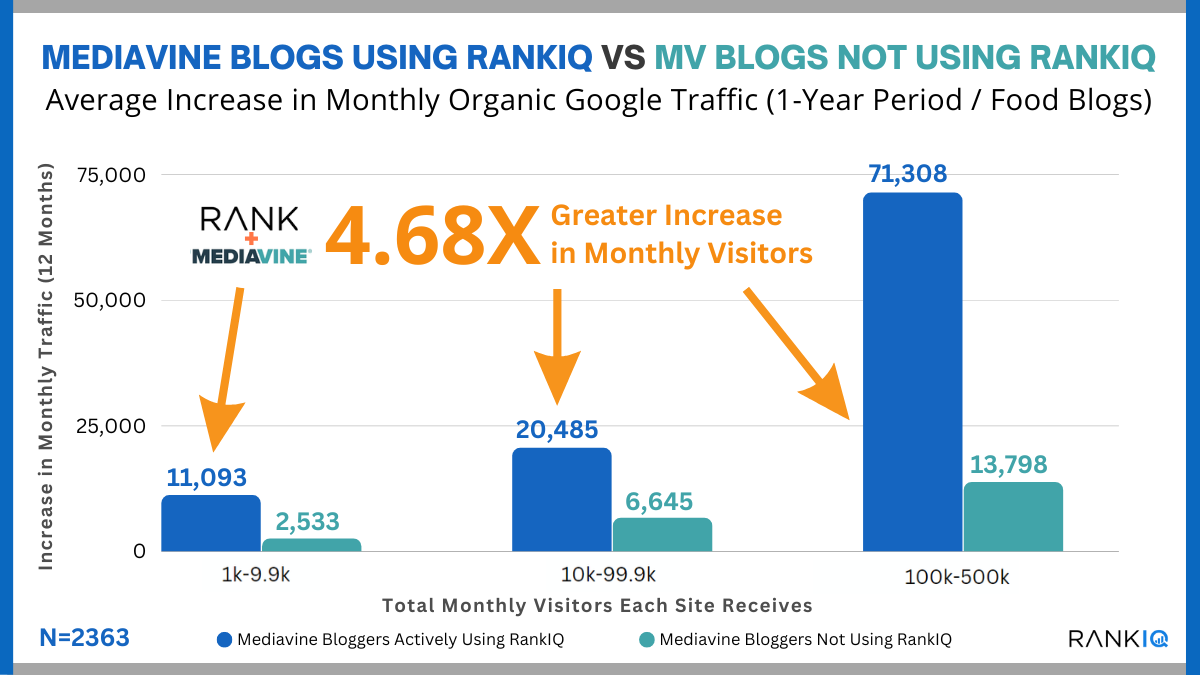
RankIQ is an innovative SEO tool that uses AI to analyze your content and provide insights on keywords, blog post structure, and optimization strategies. Its primary focus is to help users create content that ranks higher on Google by suggesting the right keywords, content structure, and competitive insights.
rankiq

RankIQ is different from other SEO tools because it doesn’t just give you a long list of keywords. Instead, it suggests high-opportunity keywords and phrases that are easier to rank for, allowing you to focus on what matters most. The tool is also well-suited for Weebly users, providing actionable data and recommendations without requiring extensive SEO knowledge.

How RankIQ Can Boost Your Weebly Site’s SEO

Here’s how RankIQ can empower Weebly website owners to optimize their sites effectively:

  1. Find the Best Keywords for Your NicheRankIQ’s keyword library offers a list of “high-ranking potential” keywords that are specifically tailored to your niche. The tool’s AI algorithm determines these keywords based on their competitiveness and search volume, so you can prioritize keywords that give you the best chance of ranking without overwhelming you with too many options.
  2. Create SEO-Optimized ContentRankIQ doesn’t stop at keywords – it guides you through creating content that performs. With its Content Optimizer feature, you can see exactly how to structure your blog posts, including headings, subheadings, and content length. The tool provides a content grading system, which allows you to measure the SEO-friendliness of your content, and it offers suggestions to improve your score. This feature is especially helpful for Weebly users, as it simplifies the SEO writing process without requiring technical adjustments on your website.
  3. Boost On-Page SEO Without Technical Know-HowOne of the biggest challenges for Weebly users is the lack of in-depth customization options for on-page SEO. RankIQ bypasses this limitation by optimizing content structure and keywords within your text. By following RankIQ’s recommendations, you ensure that your website content meets Google’s SEO standards, even if Weebly’s platform doesn’t offer advanced SEO tools.
  4. Save Time and Effort with AI-Powered AnalysisRankIQ is designed to save time. Instead of spending hours analyzing keywords, competitors, and SEO metrics, the tool’s AI engine does it for you. This time efficiency allows you to focus more on creating high-quality content and less on time-consuming SEO research. The result? A well-optimized website in a fraction of the time, giving you more room to grow your business and engage with your audience.
  5. Access a Curated Library of SEO Tips and ResourcesRankIQ offers an extensive library of SEO tips and resources, empowering even SEO novices to improve their site’s performance. From beginner-friendly guides to advanced strategies, RankIQ provides Weebly users with the knowledge they need to make impactful changes to their site.

Getting Started with RankIQ on Your Weebly Website
rankiq

Using RankIQ on your Weebly website is a straightforward process:

  • Sign Up and Define Your Niche: Create an account on RankIQ and specify your niche. This allows RankIQ to provide you with the most relevant keyword and content recommendations.
  • Optimize Your Content: Input your current blog posts or content ideas into RankIQ, and the tool will suggest improvements for better ranking potential. It provides keyword lists, content structure, and competitive analysis, which you can implement directly within Weebly’s editor.
  • Track Your Progress: RankIQ enables you to track the ranking progress of each optimized post, allowing you to see real-time results from your SEO efforts. By monitoring how your content performs, you can make adjustments to maintain your rank.

Benefits of Using RankIQ for Weebly Sites

RankIQ’s benefits are clear, especially for Weebly users who are looking to improve their site’s SEO without extensive technical knowledge. Here’s why RankIQ is worth considering:

  • Ease of Use: RankIQ’s user-friendly interface makes it simple for anyone to get started with SEO.
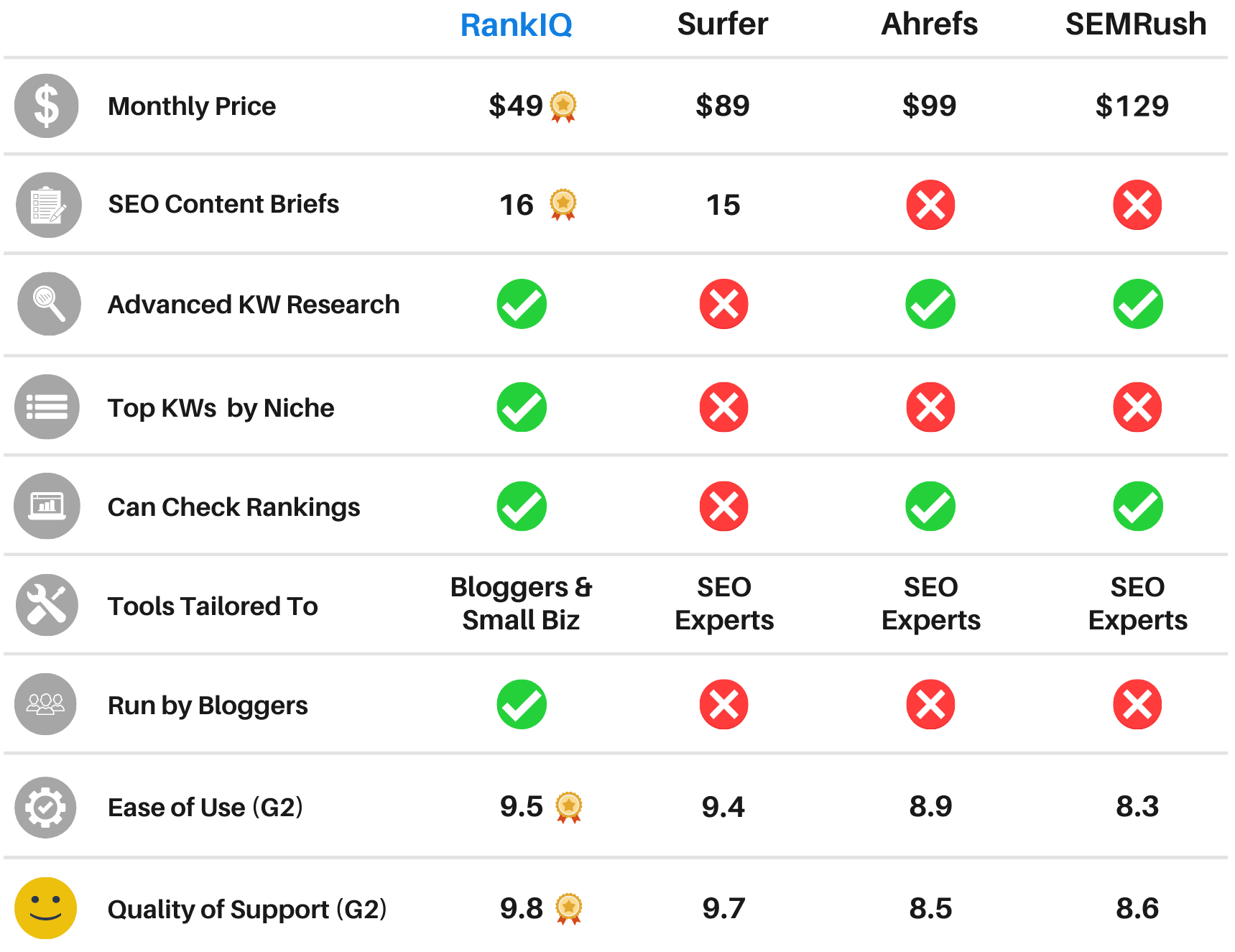
  • Cost-Effective: RankIQ’s affordable pricing makes it accessible for small businesses and independent website owners.
  • Focused Optimization: The tool’s AI capabilities help you focus on high-impact SEO strategies, avoiding common pitfalls and wasted efforts.
  • Proven Results: Many users have reported significant increases in search rankings and organic traffic by following RankIQ’s recommendations.

Conclusion

If you’re a Weebly website owner looking to improve your search engine rankings, RankIQ is one of the best AI-powered tools available. It simplifies the SEO process, making it accessible even to beginners, while providing powerful insights and recommendations for creating high-ranking content.

By using RankIQ, you’re not just optimizing for keywords – you’re optimizing for success. Give your Weebly site the boost it deserves and experience the difference that AI-powered SEO can make.

Ready to elevate your Weebly website’s ranking? Get started with RankIQ today and see how it transforms your SEO strategy and brings you closer to your audience.

free weebly themes

Top 7 Responsive Weebly Themes 2025

Weebly is one of the top website builders available for building a website. This is due not only to an intuitive design and layout but to a selection of outstanding themes that can make your website look like a million bucks.

Well, the right look is everything on the Internet, and because of that; here we’re listing the top 5 Weebly themes. These designs are stunning and provide you with complete control over your content.

Related: Top 7 Best Multi-purpose Weebly Themes for 2025

Top 7 Responsive & Beautiful Weebly Themes to Build Awesome Websites 2025

#1 Rockon

This template is perfect for night life, night club, pub, dj, music, party, bar, events, concerts and similar other business.

Weebly theme

[fusion_button link=”https://1.envato.market/1995gd” title=”” target=”_self” link_attributes=”” alignment=”center” modal=”” hide_on_mobile=”small-visibility,medium-visibility,large-visibility” class=”” id=”” color=”default” button_gradient_top_color=”” button_gradient_bottom_color=”” button_gradient_top_color_hover=”” button_gradient_bottom_color_hover=”” accent_color=”” accent_hover_color=”” type=”” bevel_color=”” border_width=”” size=”” stretch=”default” shape=”” icon=”” icon_position=”left” icon_divider=”no” animation_type=”” animation_direction=”left” animation_speed=”0.3″ animation_offset=””]GET THEME[/fusion_button]

#2 inspiron

“inspiron” is a Weebly template that includes a lots of features, clean & modern design, you can make an awesome website for your products in minutes with inspiron.

inspiron

[fusion_button link=”https://1.envato.market/555bqL” title=”” target=”_self” link_attributes=”” alignment=”center” modal=”” hide_on_mobile=”small-visibility,medium-visibility,large-visibility” class=”” id=”” color=”default” button_gradient_top_color=”” button_gradient_bottom_color=”” button_gradient_top_color_hover=”” button_gradient_bottom_color_hover=”” accent_color=”” accent_hover_color=”” type=”” bevel_color=”” border_width=”” size=”” stretch=”default” shape=”” icon=”” icon_position=”left” icon_divider=”no” animation_type=”” animation_direction=”left” animation_speed=”0.3″ animation_offset=””]GET THEME[/fusion_button]

#3 Techiz

Techiz is a classic with some impressive accessories. Always in style, Techiz delivers subtle, yet impressive design elements with neutral backgrounds that set the tone for a range of beautiful website building options.

Techiz weebly theme

[fusion_button link=”https://weeblytutorials.com/downloads/techiz-weebly-theme/” title=”” target=”_self” link_attributes=”” alignment=”center” modal=”” hide_on_mobile=”small-visibility,medium-visibility,large-visibility” class=”” id=”” color=”default” button_gradient_top_color=”” button_gradient_bottom_color=”” button_gradient_top_color_hover=”” button_gradient_bottom_color_hover=”” accent_color=”” accent_hover_color=”” type=”” bevel_color=”” border_width=”” size=”” stretch=”default” shape=”” icon=”” icon_position=”left” icon_divider=”no” animation_type=”” animation_direction=”left” animation_speed=”0.3″ animation_offset=””]GET THEME[/fusion_button]

#4 Mamamia

Mamamia gives any website the design and structure of world class online publications. With its roots in black and white type, Paper can accommodate a wide range of content and incorporate it into dynamic, engaging layouts. Mamamia’s storefront also features a terrific new product hover effect that highlights your eCommerce offerings. Do not miss out on Paper.

Mamamia

[fusion_button link=”https://weeblytutorials.com/downloads/mamamia-weebly-theme/” title=”” target=”_self” link_attributes=”” alignment=”center” modal=”” hide_on_mobile=”small-visibility,medium-visibility,large-visibility” class=”” id=”” color=”default” button_gradient_top_color=”” button_gradient_bottom_color=”” button_gradient_top_color_hover=”” button_gradient_bottom_color_hover=”” accent_color=”” accent_hover_color=”” type=”” bevel_color=”” border_width=”” size=”” stretch=”default” shape=”” icon=”” icon_position=”left” icon_divider=”no” animation_type=”” animation_direction=”left” animation_speed=”0.3″ animation_offset=””]GET THEME[/fusion_button]

#5 Mushroom6

Mushroom6 gives your website an editorial, photo-first sense of style. With beautiful headline fade effects and navigation elements that transition as you scroll, Mushroom6 ensures that your content always looks stunning. Birdseye’s simple color palette allows your photos and content to do the talking.

Mashroom6

[fusion_button link=”https://weeblytutorials.com/downloads/mashroom6-weebly-theme/” title=”” target=”_self” link_attributes=”” alignment=”center” modal=”” hide_on_mobile=”small-visibility,medium-visibility,large-visibility” class=”” id=”” color=”default” button_gradient_top_color=”” button_gradient_bottom_color=”” button_gradient_top_color_hover=”” button_gradient_bottom_color_hover=”” accent_color=”” accent_hover_color=”” type=”” bevel_color=”” border_width=”” size=”” stretch=”default” shape=”” icon=”” icon_position=”left” icon_divider=”no” animation_type=”” animation_direction=”left” animation_speed=”0.3″ animation_offset=””]GET THEME[/fusion_button]

#6 Touristy

Toursity gives your website an extra wash of color and sophisticated design elements. The professional palettes and fixed navigation allow your content and brand to remain beautifully positioned on all pages.

Toursity

[fusion_button link=”https://weeblytutorials.com/downloads/touristy-weebly-theme/” title=”” target=”_self” link_attributes=”” alignment=”center” modal=”” hide_on_mobile=”small-visibility,medium-visibility,large-visibility” class=”” id=”” color=”default” button_gradient_top_color=”” button_gradient_bottom_color=”” button_gradient_top_color_hover=”” button_gradient_bottom_color_hover=”” accent_color=”” accent_hover_color=”” type=”” bevel_color=”” border_width=”” size=”” stretch=”default” shape=”” icon=”” icon_position=”left” icon_divider=”no” animation_type=”” animation_direction=”left” animation_speed=”0.3″ animation_offset=””]GET THEME[/fusion_button]

#7 Massimo

Massimo is a fashion forward, ultra-clean theme that gives your website a modern and approachable feel. With a sleek black and gold palette Haberdasher keeps your content classy.

Massimo

[fusion_button link=”https://weeblytutorials.com/downloads/massimo-weebly-theme/” title=”” target=”_self” link_attributes=”” alignment=”center” modal=”” hide_on_mobile=”small-visibility,medium-visibility,large-visibility” class=”” id=”” color=”default” button_gradient_top_color=”” button_gradient_bottom_color=”” button_gradient_top_color_hover=”” button_gradient_bottom_color_hover=”” accent_color=”” accent_hover_color=”” type=”” bevel_color=”” border_width=”” size=”” stretch=”default” shape=”” icon=”” icon_position=”left” icon_divider=”no” animation_type=”” animation_direction=”left” animation_speed=”0.3″ animation_offset=””]GET THEME[/fusion_button]

To import a purchased theme into your Weebly site, follow these steps:

  1. Prepare the Theme File:
    • Download the theme .zip file, as Weebly requires themes to be in this format.
  2. Access Your Weebly Site Editor:
    • Log in to your Weebly account and select the site where you want to apply the new theme.
  3. Navigate to the Theme Section:
    • In the Weebly editor, click on the Theme tab located in the top navigation bar.
  4. Import the Theme:
    • Click on Change Theme.
    • In the top-right corner, click on Import Theme.
    • A dialog box will appear; click on the Select a Theme button.
    • Browse your computer to locate and select the .zip file of your purchased theme.
    • Click Open to upload the theme.
  5. Apply the Imported Theme:
    • Once the theme is uploaded, it will appear under the Custom Themes section.
    • Hover over the new theme and click on Choose to apply it to your site.
  6. Publish Your Site:
    • After applying the new theme, click on the Publish button to make the changes live on your website.

Want to set your online presence into motion? Create a website with Weebly!

If you liked this article, then you may consider subscribing to our WeeblyTutorials YouTube Channel for Weebly video tutorials. You can also find us on X and Facebook.

Best Weebly themes

Top 9 Best Multi-Purpose Weebly Themes for 2025

Are you looking for the best multi-purpose themes for your Weebly website? Multi-purpose themes are Weebly themes that can be used to create almost any kind of website.

Well, in this post, we have hand-picked some of the best Weebly multi-purpose themes. We hand pick themes based on several criteria such as theme reputation, quality of their code and support services etc. This list contains mainly paid premium Weebly themes.

Building a Weebly Website with a Multi-purpose Weebly Theme

If you have already decided to use and create a website with Weebly, and after purchasing your Weebly plan and domain name, you can head over to our guide on how to make a website for step by step setup instructions.

Well, now, let’s take a look at the best Weebly themes that you can use to build your website.

Best Weebly Themes for 2025

Here are the best resources to find Weebly themes. We’re listing here already some of our hand-picked Weebly themes to help you on your selection of a new template.

#1 Rockon

This template is perfect for night life, night club, pub, dj, music, party, bar, events, concerts and similar other business.

Weebly theme

[fusion_button link=”https://1.envato.market/1995gd” title=”” target=”_self” link_attributes=”” alignment=”center” modal=”” hide_on_mobile=”small-visibility,medium-visibility,large-visibility” class=”” id=”” color=”default” button_gradient_top_color=”” button_gradient_bottom_color=”” button_gradient_top_color_hover=”” button_gradient_bottom_color_hover=”” accent_color=”” accent_hover_color=”” type=”” bevel_color=”” border_width=”” size=”” stretch=”default” shape=”” icon=”” icon_position=”left” icon_divider=”no” animation_type=”” animation_direction=”left” animation_speed=”0.3″ animation_offset=””]GET THEME[/fusion_button]

#2 inspiron

“inspiron” is a Weebly template that includes a lots of features, clean & modern design, you can make an awesome website for your products in minutes with inspiron.

inspiron

[fusion_button link=”https://1.envato.market/555bqL” title=”” target=”_self” link_attributes=”” alignment=”center” modal=”” hide_on_mobile=”small-visibility,medium-visibility,large-visibility” class=”” id=”” color=”default” button_gradient_top_color=”” button_gradient_bottom_color=”” button_gradient_top_color_hover=”” button_gradient_bottom_color_hover=”” accent_color=”” accent_hover_color=”” type=”” bevel_color=”” border_width=”” size=”” stretch=”default” shape=”” icon=”” icon_position=”left” icon_divider=”no” animation_type=”” animation_direction=”left” animation_speed=”0.3″ animation_offset=””]GET THEME[/fusion_button]

#3 Simplify

Simplify is a timeless choice with impressive features. Always elegant, Simplify offers clean, understated design elements with neutral backgrounds that create the perfect foundation for building stunning websites effortlessly.

Simplify Weebly theme

[fusion_button link=”https://weeblytutorials.com/downloads/simplify-weebly-theme/” title=”” target=”_self” link_attributes=”” alignment=”center” modal=”” hide_on_mobile=”small-visibility,medium-visibility,large-visibility” class=”” id=”” color=”default” button_gradient_top_color=”” button_gradient_bottom_color=”” button_gradient_top_color_hover=”” button_gradient_bottom_color_hover=”” accent_color=”” accent_hover_color=”” type=”” bevel_color=”” border_width=”” size=”” stretch=”default” shape=”” icon=”” icon_position=”left” icon_divider=”no” animation_type=”” animation_direction=”left” animation_speed=”0.3″ animation_offset=””]GET THEME[/fusion_button]

#4 Aqua

With bold fonts, big colors and impressive images, Aqua gives your website a strong visual impression that encourages exploration. The theme’s headline fade provides additional transition effects that add even more depth to the sharply designed page types.

Aqua

[fusion_button link=”https://weeblytutorials.com/downloads/aqua-weebly-theme/” title=”” target=”_self” link_attributes=”” alignment=”center” modal=”” hide_on_mobile=”small-visibility,medium-visibility,large-visibility” class=”” id=”” color=”default” button_gradient_top_color=”” button_gradient_bottom_color=”” button_gradient_top_color_hover=”” button_gradient_bottom_color_hover=”” accent_color=”” accent_hover_color=”” type=”” bevel_color=”” border_width=”” size=”” stretch=”default” shape=”” icon=”” icon_position=”left” icon_divider=”no” animation_type=”” animation_direction=”left” animation_speed=”0.3″ animation_offset=””]GET THEME[/fusion_button]

#5 Mushroom6

Mushroom6 gives your website an editorial, photo-first sense of style. With beautiful headline fade effects and navigation elements that transition as you scroll, Mushroom6 ensures that your content always looks stunning. Birdseye’s simple color palette allows your photos and content to do the talking.

Mashroom6

[fusion_button link=”https://weeblytutorials.com/downloads/mashroom6-weebly-theme/” title=”” target=”_self” link_attributes=”” alignment=”center” modal=”” hide_on_mobile=”small-visibility,medium-visibility,large-visibility” class=”” id=”” color=”default” button_gradient_top_color=”” button_gradient_bottom_color=”” button_gradient_top_color_hover=”” button_gradient_bottom_color_hover=”” accent_color=”” accent_hover_color=”” type=”” bevel_color=”” border_width=”” size=”” stretch=”default” shape=”” icon=”” icon_position=”left” icon_divider=”no” animation_type=”” animation_direction=”left” animation_speed=”0.3″ animation_offset=””]GET THEME[/fusion_button]

#6 Techiz

Techiz is a classic with some impressive accessories. Always in style, Techiz delivers subtle, yet impressive design elements with neutral backgrounds that set the tone for a range of beautiful website building options.

Techiz weebly theme

[fusion_button link=”https://weeblytutorials.com/downloads/techiz-weebly-theme/” title=”” target=”_self” link_attributes=”” alignment=”center” modal=”” hide_on_mobile=”small-visibility,medium-visibility,large-visibility” class=”” id=”” color=”default” button_gradient_top_color=”” button_gradient_bottom_color=”” button_gradient_top_color_hover=”” button_gradient_bottom_color_hover=”” accent_color=”” accent_hover_color=”” type=”” bevel_color=”” border_width=”” size=”” stretch=”default” shape=”” icon=”” icon_position=”left” icon_divider=”no” animation_type=”” animation_direction=”left” animation_speed=”0.3″ animation_offset=””]GET THEME[/fusion_button]

#7 Mamamia

Mamamia gives any website the design and structure of world class online publications. With its roots in black and white type, Paper can accommodate a wide range of content and incorporate it into dynamic, engaging layouts. Mamamia’s storefront also features a terrific new product hover effect that highlights your eCommerce offerings. Do not miss out on Paper.

Mamamia

[fusion_button link=”https://weeblytutorials.com/downloads/mamamia-weebly-theme/” title=”” target=”_self” link_attributes=”” alignment=”center” modal=”” hide_on_mobile=”small-visibility,medium-visibility,large-visibility” class=”” id=”” color=”default” button_gradient_top_color=”” button_gradient_bottom_color=”” button_gradient_top_color_hover=”” button_gradient_bottom_color_hover=”” accent_color=”” accent_hover_color=”” type=”” bevel_color=”” border_width=”” size=”” stretch=”default” shape=”” icon=”” icon_position=”left” icon_divider=”no” animation_type=”” animation_direction=”left” animation_speed=”0.3″ animation_offset=””]GET THEME[/fusion_button]

#8 Touristy

Toursity gives your website an extra wash of color and sophisticated design elements. The professional palettes and fixed navigation allow your content and brand to remain beautifully positioned on all pages.

Toursity

[fusion_button link=”https://weeblytutorials.com/downloads/touristy-weebly-theme/” title=”” target=”_self” link_attributes=”” alignment=”center” modal=”” hide_on_mobile=”small-visibility,medium-visibility,large-visibility” class=”” id=”” color=”default” button_gradient_top_color=”” button_gradient_bottom_color=”” button_gradient_top_color_hover=”” button_gradient_bottom_color_hover=”” accent_color=”” accent_hover_color=”” type=”” bevel_color=”” border_width=”” size=”” stretch=”default” shape=”” icon=”” icon_position=”left” icon_divider=”no” animation_type=”” animation_direction=”left” animation_speed=”0.3″ animation_offset=””]GET THEME[/fusion_button]

#9 Massimo

Massimo is a fashion forward, ultra-clean theme that gives your website a modern and approachable feel. With a sleek black and gold palette Haberdasher keeps your content classy.

Massimo

[fusion_button link=”https://weeblytutorials.com/downloads/massimo-weebly-theme/” title=”” target=”_self” link_attributes=”” alignment=”center” modal=”” hide_on_mobile=”small-visibility,medium-visibility,large-visibility” class=”” id=”” color=”default” button_gradient_top_color=”” button_gradient_bottom_color=”” button_gradient_top_color_hover=”” button_gradient_bottom_color_hover=”” accent_color=”” accent_hover_color=”” type=”” bevel_color=”” border_width=”” size=”” stretch=”default” shape=”” icon=”” icon_position=”left” icon_divider=”no” animation_type=”” animation_direction=”left” animation_speed=”0.3″ animation_offset=””]GET THEME[/fusion_button]

To import a purchased theme into your Weebly site, follow these steps:

  1. Prepare the Theme File:
    • Download the theme .zip file, as Weebly requires themes to be in this format.
  2. Access Your Weebly Site Editor:
    • Log in to your Weebly account and select the site where you want to apply the new theme.
  3. Navigate to the Theme Section:
    • In the Weebly editor, click on the Theme tab located in the top navigation bar.
  4. Import the Theme:
    • Click on Change Theme.
    • In the top-right corner, click on Import Theme.
    • A dialog box will appear; click on the Select a Theme button.
    • Browse your computer to locate and select the .zip file of your purchased theme.
    • Click Open to upload the theme.
  5. Apply the Imported Theme:
    • Once the theme is uploaded, it will appear under the Custom Themes section.
    • Hover over the new theme and click on Choose to apply it to your site.
  6. Publish Your Site:
    • After applying the new theme, click on the Publish button to make the changes live on your website.

Additional Reading

If you liked this article, then you may consider subscribing to our WeeblyTutorials YouTube Channel for Weebly video tutorials. 

Free vs Premium Weebly Themes

Free vs Premium Weebly Themes (Pros and Cons)

We are often asked by beginners how to choose between free vs premium Weebly themes. What are the advantages and disadvantages? If you too had those questions, then you’re in the right place. In this article, we will discuss free Weebly themes vs premium Weebly themes (pros and cons).

Pros of Free Weebly Themes

First, we would like to mention that when we say free themes, we mean free Weebly themes that are listed in the official Weebly.com Themes directory.

We DO NOT recommend users to download and install any free themes that are distributed by other unreliable sources.

It’s Free

The biggest benefit of a free Weebly theme is the cost, free. It lowers the barrier of entry to starting a website.

Strict Review Process

Free Weebly themes are held to a higher quality standard. All themes in the official Weebly theme directory go through a strict theme review process.

There are some very talented folks in the theme review team who examine and test these themes before they are included into the directory.

Free Weebly themes are tested for standard compliant code, support for standard Weebly features, quality HTML and CSS, security, privacy, etc.

As you can imagine, it takes talented developers to build a quality Weebly themes that get approved in the official directory.

Cons of Free Weebly Themes

Disadvantages of free or premium Weebly themes can be very subjective. What one person would consider a disadvantage, may not be a cause of concern for many others.

These are some common disadvantages of using a free Weebly theme:

  1. Limited support options – Free Weebly theme developers offer support through Weebly forums, but they are not obliged to reply to support queries.
  2. Limited Features and Functionality – Even though free themes support most standard Weebly features, many of them don’t offer extra features like creating buttons, using shortcodes, create landing pages, etc.
  3. Not so Unique – Free themes are used by a lot of websites and blogs, so your website will not have a unique design. Also there are usually limited options to customize the visual appearance of free themes.

Pros of Premium Weebly Themes

Unlike free themes, premium Weebly themes are available for purchase from numerous third-party Weebly theme shops and marketplaces.

More features and customization options

The biggest advantage of a premium theme is that you get more features and customization options.

Due to the competition in the premium theme industry, theme shops are always trying to offer more features at lower prices.

More Unique

Because there’s a cost associated to premium themes, they’re less frequently used when compared to free themes.

Not to mention the customization options give you the ability personalize your theme.

Combining the two, your website will stand out and look unique.

Cons of Premium Weebly Themes

Not all premium themes are perfect.

Here are some common issues that can be a disadvantage.

    1. Too many features – In order to sell more themes, theme developers can add too many unnecessary features into their themes. You will probably never use all those features, but they are still there making your website slow.
    2. Crossing over into Plugins domain – Sometimes Weebly themes can cross over into plugins domain, offering functionality that they are not supposed to offer. For example, creating custom post types, shortcodes, and other things that would disappear as soon as you switch theme

How to find premium themes that are really as good as promised?

The easiest way to find a good reliable premium theme is by buying it from one of the trusted theme shops and developers.

Weebly website-speed.png

How To Speed Up Your Weebly Site? A Complete Guide

Is your Weebly website slow? If yes, we need to work on that.

Wait, also, and if your website loads pretty quickly, can it be made even quicker – Every millisecond literally makes a difference. That’s why we’re publishing this article. Will simply explain how to speed up your Weebly website. We’ll get to that in a bit.

Before we dig more into the details and explain how you can make your website load a way faster, We will try to stress the importance of having a fast loading website.

Weebly website speed

Does Website Speed Matter?

Website load speed matters a great deal to ensure good search engine ranking and a great user experience. It is a known fact that Google’s search algorithm and most of the rest of the different search engines take into account your page load times as one of the many things while calculating page rank.

TYPES OF OPTIMIZATION – Speed Up a Weebly Website

There are two basic types of optimization for your Weebly website that you should focus on

  • On Page Optimization
  • Off Page Optimization
  • PageBoost For Weebly

Will try to go through them so you have a better understanding speeding up your Weebly website.

Weebly On Page Optimization

This type of optimization revolves around the things you do directly on your website. For speeding up a Weebly websites load time these things include

  • Fast loading templates/themes
  • Properly formatted and optimized images
  • Clean HTML and CSS

With the proper techniques and some cleaning of the clutter on your Weebly website, you can do a lot to speed things up. First let’s focus on the very basics of building your Website, the theme.

Themes are the groundwork of everything your website is based on and are the first elements that load for a Weebly website. To ensure you have a fast loading Weebly theme you have to make sure that it keeps certain load time variables correct.

  1. Keep things minimal if you can.
  2. Minimize the use of images and multimedia.
  3. Properly format images to the desired size, either with Microsoft paint or another tool and keep them as small as possible.
  4. Keep your HTML and CSS as clean and un-cluttered as you can. Try not to use too many add on-s.
  5. Utilize CSS effects for headers, backgrounds, and menus, instead of using full-size images.

Moral of the story, the more you have, the longer it takes to load. Following some simple disciplines in your websites creation can save you on load time.

Weebly Off Page Optimization

There are some simple on-page factors and practices to follow when building your website. Off page optimization factors for a Weebly website are a little trickier. Weebly has its hosting tied in with all of the other services it provides.

While Weebly offers a very efficient form of cloud hosting to customers it can still bog down on load times. Also, optimization becomes difficult because there is little you can do to tweak load time factors that have to do with your Weebly hosting.

The workaround I have found is to include your Weebly website into a content delivery network, or CDN for short. Content delivery networks make your website load faster by caching your website on their servers.

This allows the CDN to more efficiently deliver your websites data and in-turn gives you a quicker load time.

PageBoost For Weebly

By default, Weebly doses not support lazy loading. This can cause extremely slow websites and poor Core Web Vitals, hurting SEO. This PageBoost plugin for Weebly speeds things up by implementing proper lazy-loading across your site. The result? A faster, leaner website with better SEO.

How does it work?

It’s simple: instead of loading everything all at once, PageBoost only loads above-the-fold content at first. Then, as the user scrolls down your website, resources like images are seamlessly loaded in the background in a very smooth way.

PageBoost only loads the content that the user is looking at. As the user scrolls, more content is loaded smoothly in the background, without altering user experience.

The end result? Your website loads quicker and ranks better in core web vitals, resulting in stronger SEO scores, happier users, and a better overall website.

To get the Weebly PageBoost, Access this page and click on Plugins.

Note: PageBoost only works when used alongside with this selection of premium Weebly themes.

Make a Weebly website

How to Make a Weebly Website in 2025 – Step by Step Guide (Free)

Weebly remains one of the easiest and most accessible website builders for individuals and small businesses looking to establish an online presence. With its intuitive drag-and-drop functionality, responsive templates, and robust features, Weebly is a great choice for anyone, even if you’re not tech-savvy. Follow this guide to learn how to create a Weebly website in 2025.

Do you want to make a Weebly website from scratch the right way? We know that the thought of creating a website can be terrifying especially when you are not a techie. Well, you’re not alone. We’re here to lend a hand.

We have helped thousands of people to start a Weebly website, we have decided to create the most comprehensive step by step guide on how to make a website without any technical knowledge.

Everything is extremely easy to follow. However, if you need help, our expert team will help you setup your Weebly website for free.


Well, if you want to do it by yourself, then let’s continue to follow our step by step guide on how to make a Weebly website.

What Do I Need to Make a Weebly Website?

Here are three things you need to start a website today:

  • A domain name (this will be the name of your website i.e weeblytutorials.com)
  • A web hosting account (this is where your website lives on the internet)
  • Your undivided attention for 20-30 minutes.

And for sure, we are here to walk you through the whole process, step by step.

How Much Does It Cost to Start a Weebly Website

Typically, the cost of a website development, done for example by a professional or an agency, can get you anywhere from $3000 – $40,000. In this tutorial, we will show you how you can start your website for less, even for free, while having full control of your website.

How to Make the Most out of this Tutorial?

Unlike others, our main aim at Weebly Tutorials is to provide the most comprehensive tutorials to help beginners start a website.

Because no one can cover everything on one page without leaving information out, we have divided this tutorial into individual, separate pages. Remember always, if you need any help, reach out to us and we will setup your weebly website for free.

Steps to Make a Weebly Website From Start to Finish

  1. How to Pick the Right Domain Name
  2. What Can Weebly Do for Me
  3. How to Point your Domain Name to Weebly
  4. Ultimate Guide: How to Start a Weebly Website (Step by Step)
  5. How to Select a Perfect Weebly Theme
  6. How to Set Up Google Analytics With Your Weebly Website
  7. Setup a Professional Email Address for Your Weebly website

Building a website on Weebly is easier than ever. Whether you’re starting a blog, launching an online store, or creating a portfolio, Weebly provides the tools to make your vision a reality. Follow this guide, and in no time, you’ll have a functional, professional-looking website ready to share with the world!

Build website with weebly

Weebly Intro – How Easy is to Build a Website with Weebly

Weebly provides a real cheap yet professional alternative to people and businesses who want to start their adventures online. It makes it easy for anyone to build a website without spending great resources nor having any technical skills.

Building a website with Weebly is incredibly straightforward, making it a popular choice for beginners and small business owners. Its drag-and-drop interface allows users to easily add and customize elements like text, images, and buttons without any coding knowledge.

Weebly offers a variety of professionally designed templates, ensuring a polished look for any website type. Features like integrated SEO tools, e-commerce options, and mobile-responsive designs simplify the process further. With Weebly’s intuitive editor and user-friendly dashboard, you can create a functional and visually appealing website in just a few hours.


Watching the video posted below, you may then notice how much Weebly is a very easy to use. It’s kind of drag and drop website builder for beginners. It offers any individual whether they have very little, or extensive website design experience the ability to build a fully functional website.

[fusion_youtube id=”U7U-z9SFDvc” width=”” height=”” autoplay=”false” api_params=”” hide_on_mobile=”small-visibility,medium-visibility,large-visibility” class=””][/fusion_youtube]

To make a way easier for you. Let’s summarize Weebly in one sentence: You sign up, click create a page, and select from over 70 “ready to go” templates. For the rest, it would be to click anywhere in the templates to edit whatever you want (images, text etc) and hit publish!  That’s it.

Before you start your Weebly website, you may want to take a look at our in-depth Weebly review.

Weebly Theme Files

Where Are my Weebly Theme Files Located

Are you willing to start modifying your website but feel completely lost at step one? This article is for you. It shows you where to find your Weebly theme files.


Suggested Reads:

Where do you Find Weebly Theme Files

Weebly theme files can be accessed via the Weebly Code editor. This tool lets you edit your theme within Weebly rather than editing a file and re-uploading it.

The procedure is quite easy. You’d just need to click on the “Edit HTML / CSS” button in the “Theme” panel of your Weebly Site Editor.

Weebly theme files

You’ll be able to see all the theme files listed there.

Additional Reading

If you liked this post, then you may consider subscribing to our WeeblyTutorials YouTube Channel for Weebly video tutorials. You can also find us on Twitter and Facebook.

How to Make a Weebly Website Load Faster

Weebly is a great solution to build professional websites using a simply drag and drop interface. With all of the amazing features that Weebly has, there are still a few downfalls. One of the main downfalls, is the limited ability to make necessary tweaks to hosting and website speed.

This post sheds the light on how to make your Weebly website load faster and some common SEO tricks that will help as well.


Different Types of Optimization

There are two basic types of optimization for your Weebly website that you should focus on
  • On Page Optimization
  • Off Page Optimization

On Page Optimization

This type of optimization in regarding the things you do directly on your website. For speeding up a Weebly websites load time these things include

  • Fast loading themes
  • Optimized images
  • Organized HTML and CSS

With the proper tricks and some cleaning of the clutter on your Weebly website, you can do a lot to speed things up.

First, to ensure you have a fast loading Weebly theme you have to make sure that it keeps certain load time variables correct.

  • Keep things minimal if you can
  • Minimize the use of images and multimedia in general
  • Properly format images to desired size
  • Keep your HTML and CSS as clean as you can

Moral of the story, the more you have, the longer it takes to load. Following some simple disciplines in your websites creation can save you on load time.

Off Page Optimization

There are some simple on page factors and practices to follow when building your website. Off page optimization factors for a Weebly website are a little trickier. Weebly has its hosting tied in with all of the other services it provides. While Weebly offers a very efficient form of cloud hosting to customers it can still bog down on load times. Also optimization becomes difficult, because there is little you can do to tweak load time factors that have to do with your Weebly hosting.

The workaround I have found is to include your Weebly website into a content delivery network, or CDN for short. Content delivery networks make your website load faster by caching your website on their servers. This allows the CDN to more efficiently deliver your websites data and in-turn gives you a quicker load time. Again this is kind of a tricky little work around and I have not tried it with a domain that is registered with Weebly, but I will and I will report my findings here when I do.

What I did to make this work is

  1. I purchased a domain name from BlueHost. This gives you better control over your DNS options for your domain.
  2. I then used Weebly’s domain transfer tool to set my new domain as the default for my Weebly website.
  3. I then followed all of the on page optimization procedures that we already discussed and constructed the website.
  4. Next, I signed up for a CloudFlare free account, just for starters and went through the set up instructions provided by Cloud Flare.
  5. Activated desired features in Cloud Flare and after about 7 days I started to see better load times. Down from 20-10 seconds total load time to 15-5 seconds total load time.
To update name servers if your domain register is  Weebly. Simply click domains scroll through the options and update the necessary name servers.

What’s CloudFlare?

Cloud Flare is a CDN that as I described earlier stores your website and delivers it in a more efficient manner. Cloud Flare also offers great security features for any website. If you are interested in Cloud Flare for your website, I suggest getting started with their free account and if you have a need for their more advanced options you could upgrade to a better plan.

We hope this article helped you learn how to make a Weebly website load faster. You may also want to see our guide on how to use CloudFlare with Weebly.

If you liked this tutorial, then you may consider subscribing to our WeeblyTutorials YouTube Channel for Weebly video tutorials. You can also find us on Twitter and Facebook.

Restore weebly website

How to Restore Weebly Website from Backup

Do you need to restore Weebly from an archive file? The backup process is one of the most important aspects of your website data management. It helps to protect your website in case of emergency – when usually something goes wrong.

However, we know that restoring a backup is not easy for beginners. Thus, in this article will guide you on how to restore a Weebly website. By the way, before we dig more into details and if you haven’t done so, you may want to take a look at our previous tutorial on how to backup a Weebly website.

restore weebly website from an archive

Restore a Weebly website from an Archive

Backups are important and mainly every webmaster should keep copies of them to restore in case of any emergency situation. Same thing applies to Weebly website. However, the issue here is that, unfortunately, Weebly does not offer a complete backup/restore solution and webmasters should be aware of this fact to avoid unforeseen scenario after building a pretty large site using Weebly.

What we mean here is that backed up Weebly archive .zip file can’t be uploaded back into another Weebly site, they are meant more as a personal backup, which defeats the very purpose of backup.


That’s the main issue. Someone who has a problem with current version of his website then the only way is to copy-paste the content from the archive backup which is really time-consuming if the site is larger in size.

In short, to restore your Weebly website using the generated backup archive, you’ll need to manually open up the HTML pages, using any IDE and copy-paste the content into your Site Editor then publish it again. Still a time-consuming but this is a solution to do so and get things back if something goes wrong.

Restore a Weebly website through Weebly Support

There’s an alternative way to restore a Weebly website. This solution is to simply get in touch with Weebly support team and gently ask them to do it for you. You’ll just need to provide them with your website URL and hopefully, they will be able to get things taken care of for you. We’ve witnessed several cases where site owners asked Weebly team to restore their accidentally deleted websites and got positive reactions.

You may reach out to Weebly team through their online community Forum or simply by sending an email to support@weeebly.com.

We hope this article helped you learn how to restore Weebly from backup. You may also want to see our ultimate step by step Weebly security guide for beginners.

If you liked this tutorial, then you may consider subscribing to our WeeblyTutorials YouTube Channel for Weebly video tutorials. You can also find us on Twitter and Facebook.