
Looking to enhance your Weebly site by adding unique header images for each page? This detailed guide walks you through the process step-by-step with expert advice, tips, and SEO-friendly techniques.

Beginner's Guide to Weebly
Looking to enhance your Weebly site by adding unique header images for each page? This detailed guide walks you through the process step-by-step with expert advice, tips, and SEO-friendly techniques.

Migrating your website to or from Weebly doesn’t have to be overwhelming. In this guide, we’ll walk you through the entire process, from setting up your new site to ensuring you don’t lose any SEO rankings. Whether you’re upgrading to a new platform or moving away from Weebly, we’ve got you covered with step-by-step instructions and tips.

Want to offer coupons and discounts on your Weebly store but don’t know where to start? Our step-by-step guide walks you through the process, ensuring you boost sales and customer loyalty with ease.

Building a classroom website with Weebly is easier than you think! Whether you’re a seasoned educator or just getting started, this guide will walk you through the steps to create a modern, interactive website that enhances your teaching experience.


Weebly is a user-friendly platform for creating websites, and adding an advanced data table widget can enhance the functionality of your site by displaying organized, interactive data. This tutorial will guide you through the steps to add an advanced data table widget to your Weebly site.

Before you start, ensure you have the following:
You can either use:
Here’s an example of using DataTables.js for an advanced table:
<head> section of your site:[fusion_code]PGxpbmsgcmVsPSJzdHlsZXNoZWV0IiBocmVmPSJodHRwczovL2Nkbi5kYXRhdGFibGVzLm5ldC8xLjEzLjUvY3NzL2pxdWVyeS5kYXRhVGFibGVzLm1pbi5jc3MiPgo8c2NyaXB0IHNyYz0iaHR0cHM6Ly9jb2RlLmpxdWVyeS5jb20vanF1ZXJ5LTMuNy4xLm1pbi5qcyI+PC9zY3JpcHQ+CjxzY3JpcHQgc3JjPSJodHRwczovL2Nkbi5kYXRhdGFibGVzLm5ldC8xLjEzLjUvanMvanF1ZXJ5LmRhdGFUYWJsZXMubWluLmpzIj48L3NjcmlwdD4K[/fusion_code]
2. Add the HTML structure for the table:
[fusion_code]PHRhYmxlIGlkPSJhZHZhbmNlZFRhYmxlIiBjbGFzcz0iZGlzcGxheSIgc3R5bGU9IndpZHRoOjEwMCUiPgogICAgPHRoZWFkPgogICAgICAgIDx0cj4KICAgICAgICAgICAgPHRoPk5hbWU8L3RoPgogICAgICAgICAgICA8dGg+UG9zaXRpb248L3RoPgogICAgICAgICAgICA8dGg+T2ZmaWNlPC90aD4KICAgICAgICAgICAgPHRoPkFnZTwvdGg+CiAgICAgICAgICAgIDx0aD5TdGFydCBkYXRlPC90aD4KICAgICAgICAgICAgPHRoPlNhbGFyeTwvdGg+CiAgICAgICAgPC90cj4KICAgIDwvdGhlYWQ+CiAgICA8dGJvZHk+CiAgICAgICAgPHRyPgogICAgICAgICAgICA8dGQ+VGlnZXIgTml4b248L3RkPgogICAgICAgICAgICA8dGQ+U3lzdGVtIEFyY2hpdGVjdDwvdGQ+CiAgICAgICAgICAgIDx0ZD5FZGluYnVyZ2g8L3RkPgogICAgICAgICAgICA8dGQ+NjE8L3RkPgogICAgICAgICAgICA8dGQ+MjAxMS8wNC8yNTwvdGQ+CiAgICAgICAgICAgIDx0ZD4kMzIwLDgwMDwvdGQ+CiAgICAgICAgPC90cj4KICAgICAgICA8IS0tIEFkZCBtb3JlIHJvd3MgYXMgbmVlZGVkIC0tPgogICAgPC90Ym9keT4KPC90YWJsZT4K[/fusion_code]
Add the JavaScript to activate the advanced table functionality:
[fusion_code]PHNjcmlwdD4KICAgICQoZG9jdW1lbnQpLnJlYWR5KGZ1bmN0aW9uKCkgewogICAgICAgICQoJyNhZHZhbmNlZFRhYmxlJykuRGF0YVRhYmxlKCk7CiAgICB9KTsKPC9zY3JpcHQ+Cg==[/fusion_code]
By following these steps, you can successfully add an advanced data table widget to your Weebly site, providing an enhanced user experience for your visitors.

In the world of website optimization, getting your Weebly site to rank higher in search engines can feel like a monumental task. With Google’s ever-changing algorithms, it’s essential to employ an effective SEO strategy to ensure your content is visible and engaging for your audience.
Enter RankIQ – a powerful AI-driven SEO tool that takes the guesswork out of optimizing your Weebly website. If you’re looking to boost your site’s ranking, attract more visitors, and streamline your SEO efforts, RankIQ could be your game-changer.
Before diving into RankIQ, let’s discuss why SEO is vital for your Weebly website. Search Engine Optimization (SEO) is the process of enhancing your website’s visibility on search engines like Google. Higher rankings translate to more visibility, credibility, and ultimately, more conversions.
For Weebly users, SEO is particularly valuable because Weebly is known for its user-friendly design but doesn’t offer the advanced SEO features that platforms like WordPress do. This is where a specialized SEO tool like RankIQ becomes invaluable.
RankIQ is an innovative SEO tool that uses AI to analyze your content and provide insights on keywords, blog post structure, and optimization strategies. Its primary focus is to help users create content that ranks higher on Google by suggesting the right keywords, content structure, and competitive insights.
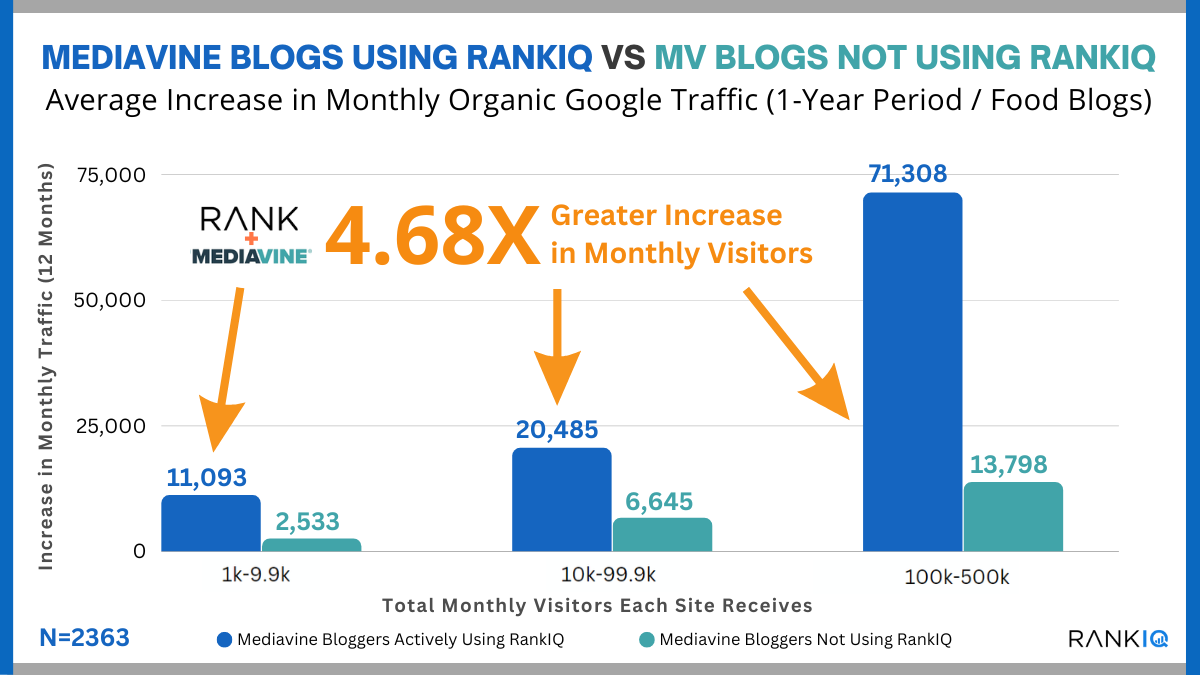
RankIQ is different from other SEO tools because it doesn’t just give you a long list of keywords. Instead, it suggests high-opportunity keywords and phrases that are easier to rank for, allowing you to focus on what matters most. The tool is also well-suited for Weebly users, providing actionable data and recommendations without requiring extensive SEO knowledge.
Here’s how RankIQ can empower Weebly website owners to optimize their sites effectively:
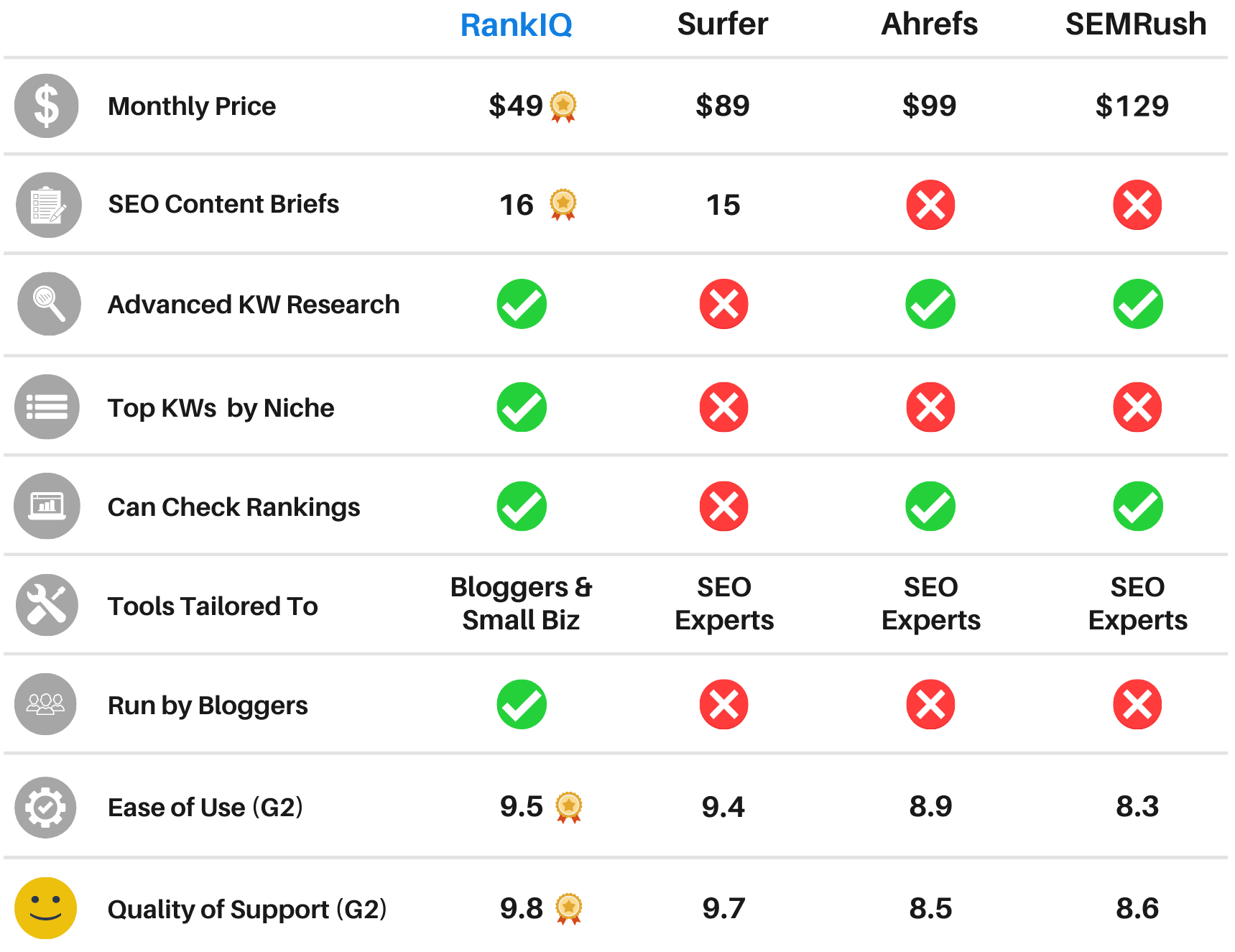
Using RankIQ on your Weebly website is a straightforward process:
RankIQ’s benefits are clear, especially for Weebly users who are looking to improve their site’s SEO without extensive technical knowledge. Here’s why RankIQ is worth considering:
If you’re a Weebly website owner looking to improve your search engine rankings, RankIQ is one of the best AI-powered tools available. It simplifies the SEO process, making it accessible even to beginners, while providing powerful insights and recommendations for creating high-ranking content.
By using RankIQ, you’re not just optimizing for keywords – you’re optimizing for success. Give your Weebly site the boost it deserves and experience the difference that AI-powered SEO can make.
Ready to elevate your Weebly website’s ranking? Get started with RankIQ today and see how it transforms your SEO strategy and brings you closer to your audience.

Weebly is one of the top website builders available for building a website. This is due not only to an intuitive design and layout but to a selection of outstanding themes that can make your website look like a million bucks.
Well, the right look is everything on the Internet, and because of that; here we’re listing the top 5 Weebly themes. These designs are stunning and provide you with complete control over your content.
Related: Top 7 Best Multi-purpose Weebly Themes for 2025
This template is perfect for night life, night club, pub, dj, music, party, bar, events, concerts and similar other business.

[fusion_button link=”https://1.envato.market/1995gd” title=”” target=”_self” link_attributes=”” alignment=”center” modal=”” hide_on_mobile=”small-visibility,medium-visibility,large-visibility” class=”” id=”” color=”default” button_gradient_top_color=”” button_gradient_bottom_color=”” button_gradient_top_color_hover=”” button_gradient_bottom_color_hover=”” accent_color=”” accent_hover_color=”” type=”” bevel_color=”” border_width=”” size=”” stretch=”default” shape=”” icon=”” icon_position=”left” icon_divider=”no” animation_type=”” animation_direction=”left” animation_speed=”0.3″ animation_offset=””]GET THEME[/fusion_button]
“inspiron” is a Weebly template that includes a lots of features, clean & modern design, you can make an awesome website for your products in minutes with inspiron.

[fusion_button link=”https://1.envato.market/555bqL” title=”” target=”_self” link_attributes=”” alignment=”center” modal=”” hide_on_mobile=”small-visibility,medium-visibility,large-visibility” class=”” id=”” color=”default” button_gradient_top_color=”” button_gradient_bottom_color=”” button_gradient_top_color_hover=”” button_gradient_bottom_color_hover=”” accent_color=”” accent_hover_color=”” type=”” bevel_color=”” border_width=”” size=”” stretch=”default” shape=”” icon=”” icon_position=”left” icon_divider=”no” animation_type=”” animation_direction=”left” animation_speed=”0.3″ animation_offset=””]GET THEME[/fusion_button]
Techiz is a classic with some impressive accessories. Always in style, Techiz delivers subtle, yet impressive design elements with neutral backgrounds that set the tone for a range of beautiful website building options.

[fusion_button link=”https://weeblytutorials.com/downloads/techiz-weebly-theme/” title=”” target=”_self” link_attributes=”” alignment=”center” modal=”” hide_on_mobile=”small-visibility,medium-visibility,large-visibility” class=”” id=”” color=”default” button_gradient_top_color=”” button_gradient_bottom_color=”” button_gradient_top_color_hover=”” button_gradient_bottom_color_hover=”” accent_color=”” accent_hover_color=”” type=”” bevel_color=”” border_width=”” size=”” stretch=”default” shape=”” icon=”” icon_position=”left” icon_divider=”no” animation_type=”” animation_direction=”left” animation_speed=”0.3″ animation_offset=””]GET THEME[/fusion_button]
Mamamia gives any website the design and structure of world class online publications. With its roots in black and white type, Paper can accommodate a wide range of content and incorporate it into dynamic, engaging layouts. Mamamia’s storefront also features a terrific new product hover effect that highlights your eCommerce offerings. Do not miss out on Paper.

[fusion_button link=”https://weeblytutorials.com/downloads/mamamia-weebly-theme/” title=”” target=”_self” link_attributes=”” alignment=”center” modal=”” hide_on_mobile=”small-visibility,medium-visibility,large-visibility” class=”” id=”” color=”default” button_gradient_top_color=”” button_gradient_bottom_color=”” button_gradient_top_color_hover=”” button_gradient_bottom_color_hover=”” accent_color=”” accent_hover_color=”” type=”” bevel_color=”” border_width=”” size=”” stretch=”default” shape=”” icon=”” icon_position=”left” icon_divider=”no” animation_type=”” animation_direction=”left” animation_speed=”0.3″ animation_offset=””]GET THEME[/fusion_button]
Mushroom6 gives your website an editorial, photo-first sense of style. With beautiful headline fade effects and navigation elements that transition as you scroll, Mushroom6 ensures that your content always looks stunning. Birdseye’s simple color palette allows your photos and content to do the talking.

[fusion_button link=”https://weeblytutorials.com/downloads/mashroom6-weebly-theme/” title=”” target=”_self” link_attributes=”” alignment=”center” modal=”” hide_on_mobile=”small-visibility,medium-visibility,large-visibility” class=”” id=”” color=”default” button_gradient_top_color=”” button_gradient_bottom_color=”” button_gradient_top_color_hover=”” button_gradient_bottom_color_hover=”” accent_color=”” accent_hover_color=”” type=”” bevel_color=”” border_width=”” size=”” stretch=”default” shape=”” icon=”” icon_position=”left” icon_divider=”no” animation_type=”” animation_direction=”left” animation_speed=”0.3″ animation_offset=””]GET THEME[/fusion_button]
Toursity gives your website an extra wash of color and sophisticated design elements. The professional palettes and fixed navigation allow your content and brand to remain beautifully positioned on all pages.

[fusion_button link=”https://weeblytutorials.com/downloads/touristy-weebly-theme/” title=”” target=”_self” link_attributes=”” alignment=”center” modal=”” hide_on_mobile=”small-visibility,medium-visibility,large-visibility” class=”” id=”” color=”default” button_gradient_top_color=”” button_gradient_bottom_color=”” button_gradient_top_color_hover=”” button_gradient_bottom_color_hover=”” accent_color=”” accent_hover_color=”” type=”” bevel_color=”” border_width=”” size=”” stretch=”default” shape=”” icon=”” icon_position=”left” icon_divider=”no” animation_type=”” animation_direction=”left” animation_speed=”0.3″ animation_offset=””]GET THEME[/fusion_button]
Massimo is a fashion forward, ultra-clean theme that gives your website a modern and approachable feel. With a sleek black and gold palette Haberdasher keeps your content classy.

[fusion_button link=”https://weeblytutorials.com/downloads/massimo-weebly-theme/” title=”” target=”_self” link_attributes=”” alignment=”center” modal=”” hide_on_mobile=”small-visibility,medium-visibility,large-visibility” class=”” id=”” color=”default” button_gradient_top_color=”” button_gradient_bottom_color=”” button_gradient_top_color_hover=”” button_gradient_bottom_color_hover=”” accent_color=”” accent_hover_color=”” type=”” bevel_color=”” border_width=”” size=”” stretch=”default” shape=”” icon=”” icon_position=”left” icon_divider=”no” animation_type=”” animation_direction=”left” animation_speed=”0.3″ animation_offset=””]GET THEME[/fusion_button]
—
To import a purchased theme into your Weebly site, follow these steps:
.zip file, as Weebly requires themes to be in this format..zip file of your purchased theme.Want to set your online presence into motion? Create a website with Weebly!
If you liked this article, then you may consider subscribing to our WeeblyTutorials YouTube Channel for Weebly video tutorials. You can also find us on X and Facebook.

Is your Weebly website slow? If yes, we need to work on that.
Wait, also, and if your website loads pretty quickly, can it be made even quicker – Every millisecond literally makes a difference. That’s why we’re publishing this article. Will simply explain how to speed up your Weebly website. We’ll get to that in a bit.
Before we dig more into the details and explain how you can make your website load a way faster, We will try to stress the importance of having a fast loading website.

Website load speed matters a great deal to ensure good search engine ranking and a great user experience. It is a known fact that Google’s search algorithm and most of the rest of the different search engines take into account your page load times as one of the many things while calculating page rank.
There are two basic types of optimization for your Weebly website that you should focus on
Will try to go through them so you have a better understanding speeding up your Weebly website.
This type of optimization revolves around the things you do directly on your website. For speeding up a Weebly websites load time these things include
With the proper techniques and some cleaning of the clutter on your Weebly website, you can do a lot to speed things up. First let’s focus on the very basics of building your Website, the theme.
Themes are the groundwork of everything your website is based on and are the first elements that load for a Weebly website. To ensure you have a fast loading Weebly theme you have to make sure that it keeps certain load time variables correct.
Moral of the story, the more you have, the longer it takes to load. Following some simple disciplines in your websites creation can save you on load time.
There are some simple on-page factors and practices to follow when building your website. Off page optimization factors for a Weebly website are a little trickier. Weebly has its hosting tied in with all of the other services it provides.
While Weebly offers a very efficient form of cloud hosting to customers it can still bog down on load times. Also, optimization becomes difficult because there is little you can do to tweak load time factors that have to do with your Weebly hosting.
The workaround I have found is to include your Weebly website into a content delivery network, or CDN for short. Content delivery networks make your website load faster by caching your website on their servers.
This allows the CDN to more efficiently deliver your websites data and in-turn gives you a quicker load time.
By default, Weebly doses not support lazy loading. This can cause extremely slow websites and poor Core Web Vitals, hurting SEO. This PageBoost plugin for Weebly speeds things up by implementing proper lazy-loading across your site. The result? A faster, leaner website with better SEO.
How does it work?
It’s simple: instead of loading everything all at once, PageBoost only loads above-the-fold content at first. Then, as the user scrolls down your website, resources like images are seamlessly loaded in the background in a very smooth way.
PageBoost only loads the content that the user is looking at. As the user scrolls, more content is loaded smoothly in the background, without altering user experience.
The end result? Your website loads quicker and ranks better in core web vitals, resulting in stronger SEO scores, happier users, and a better overall website.
To get the Weebly PageBoost, Access this page and click on Plugins.
Note: PageBoost only works when used alongside with this selection of premium Weebly themes.

Weebly remains one of the easiest and most accessible website builders for individuals and small businesses looking to establish an online presence. With its intuitive drag-and-drop functionality, responsive templates, and robust features, Weebly is a great choice for anyone, even if you’re not tech-savvy. Follow this guide to learn how to create a Weebly website in 2025.
Do you want to make a Weebly website from scratch the right way? We know that the thought of creating a website can be terrifying especially when you are not a techie. Well, you’re not alone. We’re here to lend a hand.
We have helped thousands of people to start a Weebly website, we have decided to create the most comprehensive step by step guide on how to make a website without any technical knowledge.
Everything is extremely easy to follow. However, if you need help, our expert team will help you setup your Weebly website for free.
Well, if you want to do it by yourself, then let’s continue to follow our step by step guide on how to make a Weebly website.
Here are three things you need to start a website today:
And for sure, we are here to walk you through the whole process, step by step.
Typically, the cost of a website development, done for example by a professional or an agency, can get you anywhere from $3000 – $40,000. In this tutorial, we will show you how you can start your website for less, even for free, while having full control of your website.
Unlike others, our main aim at Weebly Tutorials is to provide the most comprehensive tutorials to help beginners start a website.
Because no one can cover everything on one page without leaving information out, we have divided this tutorial into individual, separate pages. Remember always, if you need any help, reach out to us and we will setup your weebly website for free.