Skip to content Skip to main navigation Skip to footer

Opinion

10 Hidden Features in Weebly You Didn’t Know About

10 Hidden Features in Weebly You Didn’t Know About

Weebly has become one of the most popular website-building platforms due to its user-friendly interface. However, many users are unaware of the hidden features that could elevate their websites to the next level. From customizing your design to boosting your site’s functionality, we’ve compiled 10 Weebly features you didn’t know existed – until now!

Weebly vs Wix

Weebly vs Wix: 10 Key Differences You Should Know in 2026

Picture this: You’ve decided it’s time to create a stunning website for your business, blog, or portfolio. You start researching, only to be bombarded with a seemingly endless number of website builders. But there are two that stand out above the rest: Weebly and Wix. Both promise to help you build a professional website with ease, but which one is truly the best for you?

The Best AI SEO Tool for Optimizing Your Weebly Website

The Best AI SEO Tool for Optimizing Your Weebly Website

In the world of website optimization, getting your Weebly site to rank higher in search engines can feel like a monumental task. With Google’s ever-changing algorithms, it’s essential to employ an effective SEO strategy to ensure your content is visible and engaging for your audience.

Enter RankIQ – a powerful AI-driven SEO tool that takes the guesswork out of optimizing your Weebly website. If you’re looking to boost your site’s ranking, attract more visitors, and streamline your SEO efforts, RankIQ could be your game-changer.

Why SEO is Crucial for Your Weebly Site

Before diving into RankIQ, let’s discuss why SEO is vital for your Weebly website. Search Engine Optimization (SEO) is the process of enhancing your website’s visibility on search engines like Google. Higher rankings translate to more visibility, credibility, and ultimately, more conversions.

For Weebly users, SEO is particularly valuable because Weebly is known for its user-friendly design but doesn’t offer the advanced SEO features that platforms like WordPress do. This is where a specialized SEO tool like RankIQ becomes invaluable.

What is RankIQ?

RankIQ is an innovative SEO tool that uses AI to analyze your content and provide insights on keywords, blog post structure, and optimization strategies. Its primary focus is to help users create content that ranks higher on Google by suggesting the right keywords, content structure, and competitive insights.

rankiq

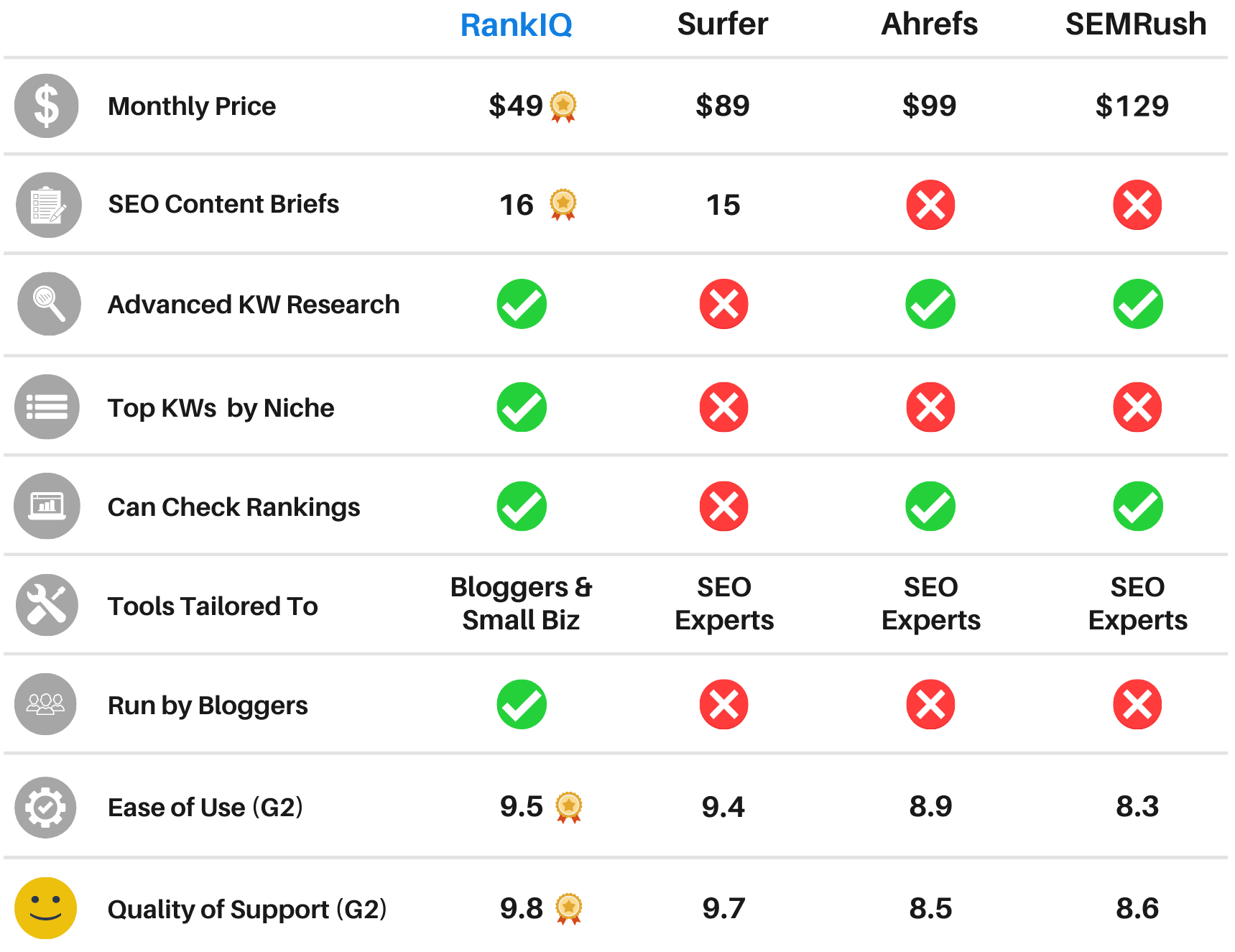
RankIQ is different from other SEO tools because it doesn’t just give you a long list of keywords. Instead, it suggests high-opportunity keywords and phrases that are easier to rank for, allowing you to focus on what matters most. The tool is also well-suited for Weebly users, providing actionable data and recommendations without requiring extensive SEO knowledge.

How RankIQ Can Boost Your Weebly Site’s SEO

Here’s how RankIQ can empower Weebly website owners to optimize their sites effectively:

  1. Find the Best Keywords for Your NicheRankIQ’s keyword library offers a list of “high-ranking potential” keywords that are specifically tailored to your niche. The tool’s AI algorithm determines these keywords based on their competitiveness and search volume, so you can prioritize keywords that give you the best chance of ranking without overwhelming you with too many options.
  2. Create SEO-Optimized ContentRankIQ doesn’t stop at keywords – it guides you through creating content that performs. With its Content Optimizer feature, you can see exactly how to structure your blog posts, including headings, subheadings, and content length. The tool provides a content grading system, which allows you to measure the SEO-friendliness of your content, and it offers suggestions to improve your score. This feature is especially helpful for Weebly users, as it simplifies the SEO writing process without requiring technical adjustments on your website.
  3. Boost On-Page SEO Without Technical Know-HowOne of the biggest challenges for Weebly users is the lack of in-depth customization options for on-page SEO. RankIQ bypasses this limitation by optimizing content structure and keywords within your text. By following RankIQ’s recommendations, you ensure that your website content meets Google’s SEO standards, even if Weebly’s platform doesn’t offer advanced SEO tools.
  4. Save Time and Effort with AI-Powered AnalysisRankIQ is designed to save time. Instead of spending hours analyzing keywords, competitors, and SEO metrics, the tool’s AI engine does it for you. This time efficiency allows you to focus more on creating high-quality content and less on time-consuming SEO research. The result? A well-optimized website in a fraction of the time, giving you more room to grow your business and engage with your audience.
  5. Access a Curated Library of SEO Tips and ResourcesRankIQ offers an extensive library of SEO tips and resources, empowering even SEO novices to improve their site’s performance. From beginner-friendly guides to advanced strategies, RankIQ provides Weebly users with the knowledge they need to make impactful changes to their site.

Getting Started with RankIQ on Your Weebly Website

rankiq

Using RankIQ on your Weebly website is a straightforward process:

  • Sign Up and Define Your Niche: Create an account on RankIQ and specify your niche. This allows RankIQ to provide you with the most relevant keyword and content recommendations.
  • Optimize Your Content: Input your current blog posts or content ideas into RankIQ, and the tool will suggest improvements for better ranking potential. It provides keyword lists, content structure, and competitive analysis, which you can implement directly within Weebly’s editor.
  • Track Your Progress: RankIQ enables you to track the ranking progress of each optimized post, allowing you to see real-time results from your SEO efforts. By monitoring how your content performs, you can make adjustments to maintain your rank.

Benefits of Using RankIQ for Weebly Sites

RankIQ’s benefits are clear, especially for Weebly users who are looking to improve their site’s SEO without extensive technical knowledge. Here’s why RankIQ is worth considering:

  • Ease of Use: RankIQ’s user-friendly interface makes it simple for anyone to get started with SEO.
  • Cost-Effective: RankIQ’s affordable pricing makes it accessible for small businesses and independent website owners.
  • Focused Optimization: The tool’s AI capabilities help you focus on high-impact SEO strategies, avoiding common pitfalls and wasted efforts.
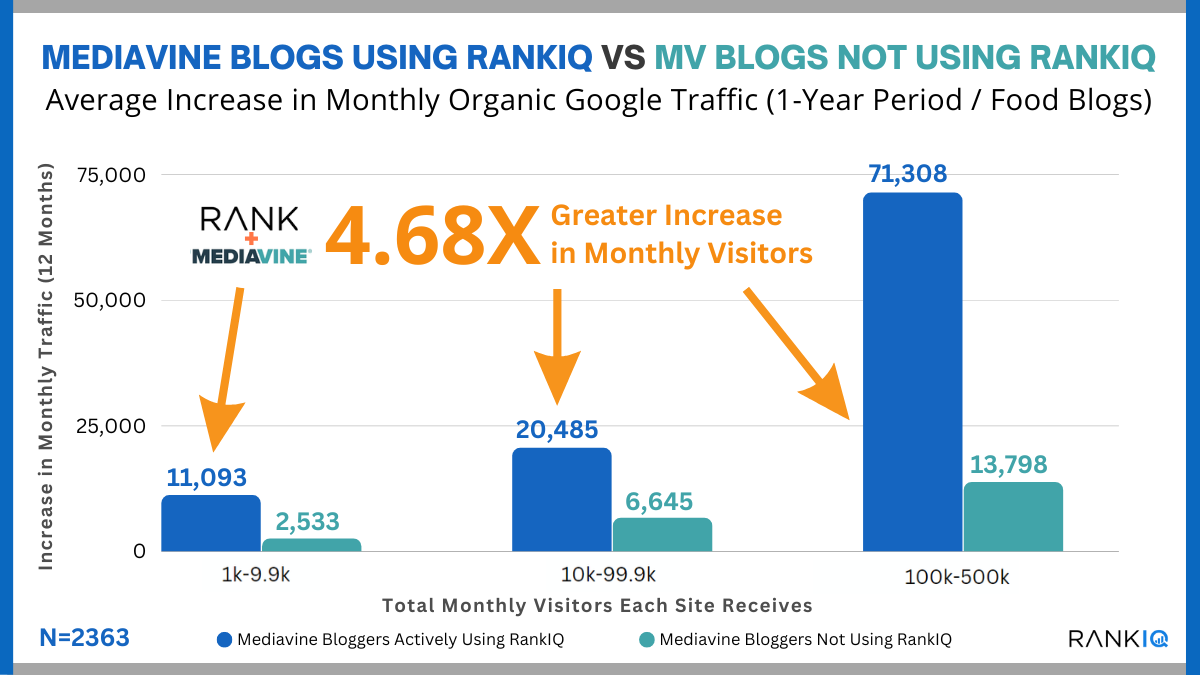
  • Proven Results: Many users have reported significant increases in search rankings and organic traffic by following RankIQ’s recommendations.

Conclusion

If you’re a Weebly website owner looking to improve your search engine rankings, RankIQ is one of the best AI-powered tools available. It simplifies the SEO process, making it accessible even to beginners, while providing powerful insights and recommendations for creating high-ranking content.

By using RankIQ, you’re not just optimizing for keywords – you’re optimizing for success. Give your Weebly site the boost it deserves and experience the difference that AI-powered SEO can make.

Ready to elevate your Weebly website’s ranking? Get started with RankIQ today and see how it transforms your SEO strategy and brings you closer to your audience.

free weebly themes

Top 7 Responsive Weebly Themes 2025

Weebly is one of the top website builders available for building a website. This is due not only to an intuitive design and layout but to a selection of outstanding themes that can make your website look like a million bucks.

Well, the right look is everything on the Internet, and because of that; here we’re listing the top 5 Weebly themes. These designs are stunning and provide you with complete control over your content.

Related: Top 7 Best Multi-purpose Weebly Themes for 2025

Top 7 Responsive & Beautiful Weebly Themes to Build Awesome Websites 2025

#1 Rockon

This template is perfect for night life, night club, pub, dj, music, party, bar, events, concerts and similar other business.

Weebly theme

[fusion_button link=”https://1.envato.market/1995gd” title=”” target=”_self” link_attributes=”” alignment=”center” modal=”” hide_on_mobile=”small-visibility,medium-visibility,large-visibility” class=”” id=”” color=”default” button_gradient_top_color=”” button_gradient_bottom_color=”” button_gradient_top_color_hover=”” button_gradient_bottom_color_hover=”” accent_color=”” accent_hover_color=”” type=”” bevel_color=”” border_width=”” size=”” stretch=”default” shape=”” icon=”” icon_position=”left” icon_divider=”no” animation_type=”” animation_direction=”left” animation_speed=”0.3″ animation_offset=””]GET THEME[/fusion_button]

#2 inspiron

“inspiron” is a Weebly template that includes a lots of features, clean & modern design, you can make an awesome website for your products in minutes with inspiron.

inspiron

[fusion_button link=”https://1.envato.market/555bqL” title=”” target=”_self” link_attributes=”” alignment=”center” modal=”” hide_on_mobile=”small-visibility,medium-visibility,large-visibility” class=”” id=”” color=”default” button_gradient_top_color=”” button_gradient_bottom_color=”” button_gradient_top_color_hover=”” button_gradient_bottom_color_hover=”” accent_color=”” accent_hover_color=”” type=”” bevel_color=”” border_width=”” size=”” stretch=”default” shape=”” icon=”” icon_position=”left” icon_divider=”no” animation_type=”” animation_direction=”left” animation_speed=”0.3″ animation_offset=””]GET THEME[/fusion_button]

#3 Techiz

Techiz is a classic with some impressive accessories. Always in style, Techiz delivers subtle, yet impressive design elements with neutral backgrounds that set the tone for a range of beautiful website building options.

Techiz weebly theme

[fusion_button link=”https://weeblytutorials.com/downloads/techiz-weebly-theme/” title=”” target=”_self” link_attributes=”” alignment=”center” modal=”” hide_on_mobile=”small-visibility,medium-visibility,large-visibility” class=”” id=”” color=”default” button_gradient_top_color=”” button_gradient_bottom_color=”” button_gradient_top_color_hover=”” button_gradient_bottom_color_hover=”” accent_color=”” accent_hover_color=”” type=”” bevel_color=”” border_width=”” size=”” stretch=”default” shape=”” icon=”” icon_position=”left” icon_divider=”no” animation_type=”” animation_direction=”left” animation_speed=”0.3″ animation_offset=””]GET THEME[/fusion_button]

#4 Mamamia

Mamamia gives any website the design and structure of world class online publications. With its roots in black and white type, Paper can accommodate a wide range of content and incorporate it into dynamic, engaging layouts. Mamamia’s storefront also features a terrific new product hover effect that highlights your eCommerce offerings. Do not miss out on Paper.

Mamamia

[fusion_button link=”https://weeblytutorials.com/downloads/mamamia-weebly-theme/” title=”” target=”_self” link_attributes=”” alignment=”center” modal=”” hide_on_mobile=”small-visibility,medium-visibility,large-visibility” class=”” id=”” color=”default” button_gradient_top_color=”” button_gradient_bottom_color=”” button_gradient_top_color_hover=”” button_gradient_bottom_color_hover=”” accent_color=”” accent_hover_color=”” type=”” bevel_color=”” border_width=”” size=”” stretch=”default” shape=”” icon=”” icon_position=”left” icon_divider=”no” animation_type=”” animation_direction=”left” animation_speed=”0.3″ animation_offset=””]GET THEME[/fusion_button]

#5 Mushroom6

Mushroom6 gives your website an editorial, photo-first sense of style. With beautiful headline fade effects and navigation elements that transition as you scroll, Mushroom6 ensures that your content always looks stunning. Birdseye’s simple color palette allows your photos and content to do the talking.

Mashroom6

[fusion_button link=”https://weeblytutorials.com/downloads/mashroom6-weebly-theme/” title=”” target=”_self” link_attributes=”” alignment=”center” modal=”” hide_on_mobile=”small-visibility,medium-visibility,large-visibility” class=”” id=”” color=”default” button_gradient_top_color=”” button_gradient_bottom_color=”” button_gradient_top_color_hover=”” button_gradient_bottom_color_hover=”” accent_color=”” accent_hover_color=”” type=”” bevel_color=”” border_width=”” size=”” stretch=”default” shape=”” icon=”” icon_position=”left” icon_divider=”no” animation_type=”” animation_direction=”left” animation_speed=”0.3″ animation_offset=””]GET THEME[/fusion_button]

#6 Touristy

Toursity gives your website an extra wash of color and sophisticated design elements. The professional palettes and fixed navigation allow your content and brand to remain beautifully positioned on all pages.

Toursity

[fusion_button link=”https://weeblytutorials.com/downloads/touristy-weebly-theme/” title=”” target=”_self” link_attributes=”” alignment=”center” modal=”” hide_on_mobile=”small-visibility,medium-visibility,large-visibility” class=”” id=”” color=”default” button_gradient_top_color=”” button_gradient_bottom_color=”” button_gradient_top_color_hover=”” button_gradient_bottom_color_hover=”” accent_color=”” accent_hover_color=”” type=”” bevel_color=”” border_width=”” size=”” stretch=”default” shape=”” icon=”” icon_position=”left” icon_divider=”no” animation_type=”” animation_direction=”left” animation_speed=”0.3″ animation_offset=””]GET THEME[/fusion_button]

#7 Massimo

Massimo is a fashion forward, ultra-clean theme that gives your website a modern and approachable feel. With a sleek black and gold palette Haberdasher keeps your content classy.

Massimo

[fusion_button link=”https://weeblytutorials.com/downloads/massimo-weebly-theme/” title=”” target=”_self” link_attributes=”” alignment=”center” modal=”” hide_on_mobile=”small-visibility,medium-visibility,large-visibility” class=”” id=”” color=”default” button_gradient_top_color=”” button_gradient_bottom_color=”” button_gradient_top_color_hover=”” button_gradient_bottom_color_hover=”” accent_color=”” accent_hover_color=”” type=”” bevel_color=”” border_width=”” size=”” stretch=”default” shape=”” icon=”” icon_position=”left” icon_divider=”no” animation_type=”” animation_direction=”left” animation_speed=”0.3″ animation_offset=””]GET THEME[/fusion_button]

To import a purchased theme into your Weebly site, follow these steps:

  1. Prepare the Theme File:
    • Download the theme .zip file, as Weebly requires themes to be in this format.
  2. Access Your Weebly Site Editor:
    • Log in to your Weebly account and select the site where you want to apply the new theme.
  3. Navigate to the Theme Section:
    • In the Weebly editor, click on the Theme tab located in the top navigation bar.
  4. Import the Theme:
    • Click on Change Theme.
    • In the top-right corner, click on Import Theme.
    • A dialog box will appear; click on the Select a Theme button.
    • Browse your computer to locate and select the .zip file of your purchased theme.
    • Click Open to upload the theme.
  5. Apply the Imported Theme:
    • Once the theme is uploaded, it will appear under the Custom Themes section.
    • Hover over the new theme and click on Choose to apply it to your site.
  6. Publish Your Site:
    • After applying the new theme, click on the Publish button to make the changes live on your website.

Want to set your online presence into motion? Create a website with Weebly!

If you liked this article, then you may consider subscribing to our WeeblyTutorials YouTube Channel for Weebly video tutorials. You can also find us on X and Facebook.

Best Weebly themes

Top 9 Best Multi-Purpose Weebly Themes for 2025

Are you looking for the best multi-purpose themes for your Weebly website? Multi-purpose themes are Weebly themes that can be used to create almost any kind of website.

Well, in this post, we have hand-picked some of the best Weebly multi-purpose themes. We hand pick themes based on several criteria such as theme reputation, quality of their code and support services etc. This list contains mainly paid premium Weebly themes.

Building a Weebly Website with a Multi-purpose Weebly Theme

If you have already decided to use and create a website with Weebly, and after purchasing your Weebly plan and domain name, you can head over to our guide on how to make a website for step by step setup instructions.

Well, now, let’s take a look at the best Weebly themes that you can use to build your website.

Best Weebly Themes for 2025

Here are the best resources to find Weebly themes. We’re listing here already some of our hand-picked Weebly themes to help you on your selection of a new template.

#1 Rockon

This template is perfect for night life, night club, pub, dj, music, party, bar, events, concerts and similar other business.

Weebly theme

[fusion_button link=”https://1.envato.market/1995gd” title=”” target=”_self” link_attributes=”” alignment=”center” modal=”” hide_on_mobile=”small-visibility,medium-visibility,large-visibility” class=”” id=”” color=”default” button_gradient_top_color=”” button_gradient_bottom_color=”” button_gradient_top_color_hover=”” button_gradient_bottom_color_hover=”” accent_color=”” accent_hover_color=”” type=”” bevel_color=”” border_width=”” size=”” stretch=”default” shape=”” icon=”” icon_position=”left” icon_divider=”no” animation_type=”” animation_direction=”left” animation_speed=”0.3″ animation_offset=””]GET THEME[/fusion_button]

#2 inspiron

“inspiron” is a Weebly template that includes a lots of features, clean & modern design, you can make an awesome website for your products in minutes with inspiron.

inspiron

[fusion_button link=”https://1.envato.market/555bqL” title=”” target=”_self” link_attributes=”” alignment=”center” modal=”” hide_on_mobile=”small-visibility,medium-visibility,large-visibility” class=”” id=”” color=”default” button_gradient_top_color=”” button_gradient_bottom_color=”” button_gradient_top_color_hover=”” button_gradient_bottom_color_hover=”” accent_color=”” accent_hover_color=”” type=”” bevel_color=”” border_width=”” size=”” stretch=”default” shape=”” icon=”” icon_position=”left” icon_divider=”no” animation_type=”” animation_direction=”left” animation_speed=”0.3″ animation_offset=””]GET THEME[/fusion_button]

#3 Simplify

Simplify is a timeless choice with impressive features. Always elegant, Simplify offers clean, understated design elements with neutral backgrounds that create the perfect foundation for building stunning websites effortlessly.

Simplify Weebly theme

[fusion_button link=”https://weeblytutorials.com/downloads/simplify-weebly-theme/” title=”” target=”_self” link_attributes=”” alignment=”center” modal=”” hide_on_mobile=”small-visibility,medium-visibility,large-visibility” class=”” id=”” color=”default” button_gradient_top_color=”” button_gradient_bottom_color=”” button_gradient_top_color_hover=”” button_gradient_bottom_color_hover=”” accent_color=”” accent_hover_color=”” type=”” bevel_color=”” border_width=”” size=”” stretch=”default” shape=”” icon=”” icon_position=”left” icon_divider=”no” animation_type=”” animation_direction=”left” animation_speed=”0.3″ animation_offset=””]GET THEME[/fusion_button]

#4 Aqua

With bold fonts, big colors and impressive images, Aqua gives your website a strong visual impression that encourages exploration. The theme’s headline fade provides additional transition effects that add even more depth to the sharply designed page types.

Aqua

[fusion_button link=”https://weeblytutorials.com/downloads/aqua-weebly-theme/” title=”” target=”_self” link_attributes=”” alignment=”center” modal=”” hide_on_mobile=”small-visibility,medium-visibility,large-visibility” class=”” id=”” color=”default” button_gradient_top_color=”” button_gradient_bottom_color=”” button_gradient_top_color_hover=”” button_gradient_bottom_color_hover=”” accent_color=”” accent_hover_color=”” type=”” bevel_color=”” border_width=”” size=”” stretch=”default” shape=”” icon=”” icon_position=”left” icon_divider=”no” animation_type=”” animation_direction=”left” animation_speed=”0.3″ animation_offset=””]GET THEME[/fusion_button]

#5 Mushroom6

Mushroom6 gives your website an editorial, photo-first sense of style. With beautiful headline fade effects and navigation elements that transition as you scroll, Mushroom6 ensures that your content always looks stunning. Birdseye’s simple color palette allows your photos and content to do the talking.

Mashroom6

[fusion_button link=”https://weeblytutorials.com/downloads/mashroom6-weebly-theme/” title=”” target=”_self” link_attributes=”” alignment=”center” modal=”” hide_on_mobile=”small-visibility,medium-visibility,large-visibility” class=”” id=”” color=”default” button_gradient_top_color=”” button_gradient_bottom_color=”” button_gradient_top_color_hover=”” button_gradient_bottom_color_hover=”” accent_color=”” accent_hover_color=”” type=”” bevel_color=”” border_width=”” size=”” stretch=”default” shape=”” icon=”” icon_position=”left” icon_divider=”no” animation_type=”” animation_direction=”left” animation_speed=”0.3″ animation_offset=””]GET THEME[/fusion_button]

#6 Techiz

Techiz is a classic with some impressive accessories. Always in style, Techiz delivers subtle, yet impressive design elements with neutral backgrounds that set the tone for a range of beautiful website building options.

Techiz weebly theme

[fusion_button link=”https://weeblytutorials.com/downloads/techiz-weebly-theme/” title=”” target=”_self” link_attributes=”” alignment=”center” modal=”” hide_on_mobile=”small-visibility,medium-visibility,large-visibility” class=”” id=”” color=”default” button_gradient_top_color=”” button_gradient_bottom_color=”” button_gradient_top_color_hover=”” button_gradient_bottom_color_hover=”” accent_color=”” accent_hover_color=”” type=”” bevel_color=”” border_width=”” size=”” stretch=”default” shape=”” icon=”” icon_position=”left” icon_divider=”no” animation_type=”” animation_direction=”left” animation_speed=”0.3″ animation_offset=””]GET THEME[/fusion_button]

#7 Mamamia

Mamamia gives any website the design and structure of world class online publications. With its roots in black and white type, Paper can accommodate a wide range of content and incorporate it into dynamic, engaging layouts. Mamamia’s storefront also features a terrific new product hover effect that highlights your eCommerce offerings. Do not miss out on Paper.

Mamamia

[fusion_button link=”https://weeblytutorials.com/downloads/mamamia-weebly-theme/” title=”” target=”_self” link_attributes=”” alignment=”center” modal=”” hide_on_mobile=”small-visibility,medium-visibility,large-visibility” class=”” id=”” color=”default” button_gradient_top_color=”” button_gradient_bottom_color=”” button_gradient_top_color_hover=”” button_gradient_bottom_color_hover=”” accent_color=”” accent_hover_color=”” type=”” bevel_color=”” border_width=”” size=”” stretch=”default” shape=”” icon=”” icon_position=”left” icon_divider=”no” animation_type=”” animation_direction=”left” animation_speed=”0.3″ animation_offset=””]GET THEME[/fusion_button]

#8 Touristy

Toursity gives your website an extra wash of color and sophisticated design elements. The professional palettes and fixed navigation allow your content and brand to remain beautifully positioned on all pages.

Toursity

[fusion_button link=”https://weeblytutorials.com/downloads/touristy-weebly-theme/” title=”” target=”_self” link_attributes=”” alignment=”center” modal=”” hide_on_mobile=”small-visibility,medium-visibility,large-visibility” class=”” id=”” color=”default” button_gradient_top_color=”” button_gradient_bottom_color=”” button_gradient_top_color_hover=”” button_gradient_bottom_color_hover=”” accent_color=”” accent_hover_color=”” type=”” bevel_color=”” border_width=”” size=”” stretch=”default” shape=”” icon=”” icon_position=”left” icon_divider=”no” animation_type=”” animation_direction=”left” animation_speed=”0.3″ animation_offset=””]GET THEME[/fusion_button]

#9 Massimo

Massimo is a fashion forward, ultra-clean theme that gives your website a modern and approachable feel. With a sleek black and gold palette Haberdasher keeps your content classy.

Massimo

[fusion_button link=”https://weeblytutorials.com/downloads/massimo-weebly-theme/” title=”” target=”_self” link_attributes=”” alignment=”center” modal=”” hide_on_mobile=”small-visibility,medium-visibility,large-visibility” class=”” id=”” color=”default” button_gradient_top_color=”” button_gradient_bottom_color=”” button_gradient_top_color_hover=”” button_gradient_bottom_color_hover=”” accent_color=”” accent_hover_color=”” type=”” bevel_color=”” border_width=”” size=”” stretch=”default” shape=”” icon=”” icon_position=”left” icon_divider=”no” animation_type=”” animation_direction=”left” animation_speed=”0.3″ animation_offset=””]GET THEME[/fusion_button]

To import a purchased theme into your Weebly site, follow these steps:

  1. Prepare the Theme File:
    • Download the theme .zip file, as Weebly requires themes to be in this format.
  2. Access Your Weebly Site Editor:
    • Log in to your Weebly account and select the site where you want to apply the new theme.
  3. Navigate to the Theme Section:
    • In the Weebly editor, click on the Theme tab located in the top navigation bar.
  4. Import the Theme:
    • Click on Change Theme.
    • In the top-right corner, click on Import Theme.
    • A dialog box will appear; click on the Select a Theme button.
    • Browse your computer to locate and select the .zip file of your purchased theme.
    • Click Open to upload the theme.
  5. Apply the Imported Theme:
    • Once the theme is uploaded, it will appear under the Custom Themes section.
    • Hover over the new theme and click on Choose to apply it to your site.
  6. Publish Your Site:
    • After applying the new theme, click on the Publish button to make the changes live on your website.

Additional Reading

If you liked this article, then you may consider subscribing to our WeeblyTutorials YouTube Channel for Weebly video tutorials. 

Free vs Premium Weebly Themes

Free vs Premium Weebly Themes (Pros and Cons)

We are often asked by beginners how to choose between free vs premium Weebly themes. What are the advantages and disadvantages? If you too had those questions, then you’re in the right place. In this article, we will discuss free Weebly themes vs premium Weebly themes (pros and cons).

Pros of Free Weebly Themes

First, we would like to mention that when we say free themes, we mean free Weebly themes that are listed in the official Weebly.com Themes directory.

We DO NOT recommend users to download and install any free themes that are distributed by other unreliable sources.

It’s Free

The biggest benefit of a free Weebly theme is the cost, free. It lowers the barrier of entry to starting a website.

Strict Review Process

Free Weebly themes are held to a higher quality standard. All themes in the official Weebly theme directory go through a strict theme review process.

There are some very talented folks in the theme review team who examine and test these themes before they are included into the directory.

Free Weebly themes are tested for standard compliant code, support for standard Weebly features, quality HTML and CSS, security, privacy, etc.

As you can imagine, it takes talented developers to build a quality Weebly themes that get approved in the official directory.

Cons of Free Weebly Themes

Disadvantages of free or premium Weebly themes can be very subjective. What one person would consider a disadvantage, may not be a cause of concern for many others.

These are some common disadvantages of using a free Weebly theme:

  1. Limited support options – Free Weebly theme developers offer support through Weebly forums, but they are not obliged to reply to support queries.
  2. Limited Features and Functionality – Even though free themes support most standard Weebly features, many of them don’t offer extra features like creating buttons, using shortcodes, create landing pages, etc.
  3. Not so Unique – Free themes are used by a lot of websites and blogs, so your website will not have a unique design. Also there are usually limited options to customize the visual appearance of free themes.

Pros of Premium Weebly Themes

Unlike free themes, premium Weebly themes are available for purchase from numerous third-party Weebly theme shops and marketplaces.

More features and customization options

The biggest advantage of a premium theme is that you get more features and customization options.

Due to the competition in the premium theme industry, theme shops are always trying to offer more features at lower prices.

More Unique

Because there’s a cost associated to premium themes, they’re less frequently used when compared to free themes.

Not to mention the customization options give you the ability personalize your theme.

Combining the two, your website will stand out and look unique.

Cons of Premium Weebly Themes

Not all premium themes are perfect.

Here are some common issues that can be a disadvantage.

    1. Too many features – In order to sell more themes, theme developers can add too many unnecessary features into their themes. You will probably never use all those features, but they are still there making your website slow.
    2. Crossing over into Plugins domain – Sometimes Weebly themes can cross over into plugins domain, offering functionality that they are not supposed to offer. For example, creating custom post types, shortcodes, and other things that would disappear as soon as you switch theme

How to find premium themes that are really as good as promised?

The easiest way to find a good reliable premium theme is by buying it from one of the trusted theme shops and developers.

Weebly vs WordPress

Weebly vs WordPress — 5 Important Differences You Should Know (2025)

Is Weebly or WordPress better? Can I transfer Weebly to WordPress? What are the main differences between Weebly and WordPress?

Well, we have made available this Weebly vs WordPress in-depth comparison to shed the light on the top 5 important differences between these two web creation solutions.

Weebly vs WordPress

Weebly is actually one of the most popular website builders available in market. It has over 50 million customers worldwide. The web builder provides a very easy to use approach to create fully functional websites.


As per recent stats (2021), WordPress powers over 34% of all the websites on the Internet. The numbers actually speak for themselves. It’s by far the most popular CMS used nowadays.

Weebly vs WordPress

Weebly WordPress
Summary
Weebly is very easy to use. No coding knowledge is needed. Its drag and drop editor makes it super practical, the available resources online, and its support team is on hand if you need some help. However, you won’t be able to customize your website to the same extent as you can with WordPress. You can create a website on Weebly for free, but you’d need to upgrade to one of its paid plans to unlock other extra features. WordPress is an open source platform, means one has full control over the design of the website. Very flexible. WordPress has a much steeper learning curve than Weebly, and you will need to have a minimum coding knowledge to use it. If you need some support, it has a huge community who can give you a helping hand. While WordPress itself is free, you’ll have to pay for things such as themes, plugins and web hosting.
Flexibility
Although you can edit the HTML & CSS codes of your Weebly website, which allows you some freedom to customize the website to a certain extent, Weebly is not an open source platform so you can’t control how some of the tools work. WordPress is an open source platform so you’ll have a lot of freedom to modify your website and how the built-in tools work.
Ease of Use
Weebly is absolutely the easiest website builder available in the market as of today, and it is a much easier web solution to use than WordPress. Weebly provides you with drag & drop website builder, so you can just drag in your content, move them around, all without having to know how to code at all. Compared it to Weebly, WordPress is a lot more challenging to learn how to use. WordPress does not offer a drag and drop interface from where you can build a website, and so how you are able to place your content is largely dependent on how the design template you choose is set up.
User Support
Weebly has a good base of Weebly tutorials if you have any questions on how to use the tools. One of the advantages is that the web builder is so easy to use, you really don’t need a whole lot of guidance to build your first Weebly website. WordPress has a massive community forum where you can ask anything WordPress-related questions. People will get all your questions answered.
Ongoing Maintenance
With Weebly, you don’t have to worry about the technical aspects of building websites. All updates, including performance and security updates are managed by their technical tam. As an open-source platform, WordPress is continually updating and improving its platform to fix bugs and improve its security. Updates can be installed within a simple mouse click in the WordPress admin dashboard.
Pricing
Weebly does offer 4 premium plans, ranging from $5 to $45 per month (pricing based on two-year billing cycle). The higher then plan, the more features you will be able to use. Note that you can still use Weebly for free, but it will display a Weebly advertisement on your web pages. This can only be removed when you upgrade to one of their paid plans or by following our step y step tutorial on how to remove free Weebly footer and customize it. To create your website using WordPress, you will have to pay for your own hosting service which costs around $8 per month. Price range varies depending on the quality of the hosting service provider. Bluehost is a popular WordPress hosting service. A premium design theme can cost from $40– $70, depending on its features. You will also have to register your own custom domain name ($10 – $15 per year).


If you’d like to know more about Weebly, you may want to check out our full Weebly review here.

Suggested Read: Weebly vs Wix — 10 Differences You Should Know About.

If you liked this in-depth Weebly vs WordPress comparison, then you may consider subscribing to our WeeblyTutorials YouTube Channel for Weebly video tutorials. You can also find us on Twitter and Facebook.

Weebly essential tutorials

10 Essential Tutorials That Every Weebly Newbie Should Know

Dear Newbie,

Weebly offers an easy way to help you make a website, but for sure, none of us was born with built-in knowledge on how to do so. This article is simply written to help new Weebly users to get things done in a proper way.


We’re listing here 10 of the most helpful Weebly tutorials that will let you get the most of Weebly features and eventually help you in your first steps as a webmaster. These articles will not only help you in creating a professional website, they will also show you how to improve your website’s overall SEO and how to professionalize everything.

How to Use the Weebly Editor – Learn to Navigate Through it as a Pro

This article showcases the tools and elements that make the Weebly Editor so marvelous. Reading that tutorial helps to understand the functions of the different elements of the Weebly site editor. Therefore, makes the process of creating your own Weebly website pretty easy and interesting.

How to Display Your Images on Weebly with Galleries

Weebly makes it super easy to upload images. However, if anyone is adding several images, then all those images will appear one after another. It obviously doesn’t look great. That’s when we need to use galleries.

A gallery lets us display images in a grid layout with columns and rows. It lets us show thumbnails for images as well. Visitors can then click on them to visualize the full image.

This tutorial shows exactly how to add an image gallery to a Weebly website, as well as how to customize the gallery outline to match the overall site design.

How to Get a Weebly Website Found on Search Results

Search engines are definitely an essential source of natural incoming traffic. This guide demonstrates the basic steps to make sure that your Weebly website is well-setup and ready to be indexed and ranked by the different search engines such as Google, Bing, Yahoo and so on.

Actually the provided steps create an optimized version or your Weebly website. One that search engines can analyze conveniently. The better they can analyze it, the higher the website ranks on search results.

How to Get a Customized Domain Name

A personalized domain name boosts website’s reliability and makes it obvious that it’s professional. Having a customized domain name also greatly enhances the website’s SEO and helps it rank higher in search engine results.

There are absolutely several methods to get a personolized domain name for your Weebly website. One can purchase a domain name directly from Weebly or with a different registrar.

If you already have a registered domain name from another registrar company, you can easily connect it to your Weebly website as well.

How to Optimize a Weebly Website for Mobile Devices

We’re getting very close to the mobile era. Everyone should be ready for it! That clearly means that no website should come without a mobile version. Mobile web use has been rapidly increasing non-stop. In some cases, it even surpasses usage from desktops and laptops.

Anyone should definitely be on top of things to not lose the incoming traffic from mobile web. The following guide helps you to set up the mobile version of your Weebly site.

How to Use Anchor Links for Better Navigation

Using anchor links properly can enhance the user experience on your website. They actually let visitors take the action you want them to do. For instance, linking a page in another web page with suitable and appropriate anchor link gives an idea to the visitors about what they are going to read.

Well, the following tutorial shows how to create anchor links In Weebly.

How to Embed Any Document to your Weebly website

At a certain point, you may want to embed files such as PDF, Word, PowerPoint and so on. Well, that’s absolutely possible and easy to do. This article shows the process of uploading any type of documents to Weebly.

How to Add External Tools with HTML Codes

If you ever find something interesting that you’d like to integrate into your own website, you can do so using Weebly HTML tool.

This gives you the ability to add any HTML code into a frame on your site. Once you publish the site, you see the embedded code line on your page. All you need to do is get the HTML code, and follow these steps on how to embed HTML code into your Weebly website.

How to Make Your Weebly Website Social Friendly

Social media is one of the most effective methods to promote your website. Making your Weebly website social friendly is essential as it allows visitors to engage with your business.

Check out this guide and learn how you can set up/add social media icons to Weebly.

How to Secure your Weebly Website

As a website owner, there is nothing more terrifying than seeing your content and work in general wiped out by a hacker or some sort of malware.

This is why we simply insist on security. Here’s an article that goes through some of the easy steps to secure the transmitted data by enabling SSL in Weebly.

Ready for more? Check the different categories in WeeblyTutorials.com for useful how-to guides on all things Weebly.


Want to set your online presence into motion? Create a website with Weebly!

If you liked this article, then you may consider subscribing to our WeeblyTutorials YouTube Channel for Weebly video tutorials. You can also find us on Twitter and Facebook.

Weebly blogs example

5 Awesome Examples of Blogs Built with Weebly

One of the most original features on Weebly is its built-in blogging platform. It’s extremely easy to manage and offers several advanced options. Here we’ve selected examples of some awesome blogs built with Weebly.


Suggested Reads:

Example 1: Luisana Cooks Blog

Weebly Blog Examples

This Weebly-powered blog has been created by Luisana Suegart. Via this blog, she shares her fast, fresh, and accessible recipes. You may take a look at his blog if you’re looking for inspiration.

Example 2: Stasia Rose Blog

Weebly Blog example 2

This website uses Weebly’s blogging platform. It’s a blog launched by Stasia to write about almost anything such as entrepreneurship, traveling, fashion etc. The blog itself looks awesome. It greets you with a clean, simplistic homepage. It’s definitely worth a visit.

Example 3: Saddle and Suede Blog

Weebly Blog Examples 3

This website is a Weebly-based blog created and maintained by two musicians. These two persons share lots of similar hobbies, tastes, and preferences. That is why they settled to dedicate the blog to the things, which make their life exciting and interesting.

Don’t miss: 10 Fantastic Websites You Didn’t Know Were Built with Weebly

Example 4: Howl Attire Blog

Weebly Blog example-4

Alicia’s personal Weebly-powered blog is amazing. She shares on it everything about her passion for nature. It’s absolutely worth a visit.

Example 5: Contemporary Urbanism Blog

Weebly Blog example-5

The blog is all about home decoration, DIY craft, fashion, and beauty. With a very simple and professional design, the website has gained a lot of reputation and has hundreds of visitors per day.

Related:

How to Choose your Perfect Domain name

How to Choose the Best Domain Name

To start a new website, you’re going to need two things:

  • A domain name (it’s your website name like weeblytutorials.com)
  • Hosting (where your website lives on the internet)

For the hosting, we’re going to use Weebly site builder which, itself, can be used for free, however, a domain name can cost you anywhere between $10 – $15 a year. We’re still good as this costs less than a Starbucks coffee, so it won’t break the bank.


Having your own top level domain name looks a way more attractive and professional than if your website is being shared with a free subdomain (like yourwebsite.weebly.com), and it’s really affordable, too.

Top 6 Tips for Choosing the Best Domain Name

When launching a website, choosing a domain name is something that you can usually worry and stress about. It’s something crucial as you don’t want to make a mistake when doing so. To make things easier for everyone, we are listing here our top 6 tips that you can use to choose the perfect domain name for your website.

1. Stick with the most-known Top Level TLDs – preferably the .com.

Domain names around the world usually end with .com, .net or .org, but in recent years, plenty of domain TLDs have come out, ranging from .club, .computer to even .sucks.

The best advice that we can give here is to avoid as much as possible using the new TLDs. In short, we simply always recommend going with a .com domain. A .com domain is still by far the most popular and credible TLD. It’s also the most memorable extension that anyone can think of. A Newer domain like .bar or .photography can seem untrustworthy.

2. Use keywords

One of the most important facts in a domain name is the keyword use. By using keywords, the different search engines will know directly what your website is about. This for sure, along with unique, high-quality content will help rank your website higher on Google.

We admit that it’s pretty difficult to find a superb domain with your target keywords. Most of them will be already registered. You will need to be patient, innovative and associate your keywords together to make your domain stick out.

3. Keep it short

Before you register a domain, ask yourself: Is it memorable? While keywords are for sure important, it’s not recommended at all to take a long domain. It’s better to have a domain name that’s short, clear and memorable. Because if it’s not the case, I mean your domain is too long or something, users may forget it easily

4. Make it catchy, easy to pronounce and spell

You may share your domain name with anyone. We advise making it easy to pronounce and spell. This will make it automatically memorable for everyone.

5. Keep it brandable

For instance, if you make a website about books then best-books-website.net is not a good choice: bookstore.com or readabook.com is a way better and brandable. You may also want to take a look at other websites with similar niche so you find out what names they’re using

6. Avoid hyphens

It’s recommended to register a domain with hyphens.
This can be a sign of spam domains, in which you do not want to be associated with. Typically, hyphenated domains are not the way to go with a professional website.

Where do I get mine? Best Place to Register a Domain Name

For the domain names, we’ve mostly used www.Bluehost.com (one of the oldest brand names when it comes to web hosting & domain registration) as our main domain registrar for almost all our projects. For sure, you can try any other domain registrar, we just recommend BlueHost as we have used it for years and everything so far has been going great. We’ve also gone out of our way to negotiate exclusive offers with them for our users. So save yourself some money and go with a recommended domain registrar.

Getting your own top level domain will also get you a personalized email address: hello@yourwebsite.com – way more professional than any other standard free email provider.

Free Domain Registration with a Paid Weebly plan 

If you’re launching a new Weebly website, then it’s a smart move to take advantage of this offer and get your domain name for free. Otherwise, you may always connect your domain name that you’ve purchased from any registrar to your Weebly.

Final Thoughts

If you are starting a website for the first time, then you may find our ultimate guide on how to start a Weebly website helpful because it walks you through everything step by step.

You may also want to check out our Weebly deals page to find the best discounts on your new domain and other web services.


If you liked this article, then please subscribe to our WeeblyTutorials YouTube Channel for Weebly video tutorials. You can also find us on Twitter and Facebook.